# Welcome

At [MOGOPLUS](https://www.mogoplus.ai/), we specialise in making sense of unstructured data within bank transactions to drive customer decisions throughout the lending lifecycle. Our enterprise intelligent insight solutions cater to diverse use cases and customer journeys across multiple sectors. We invite clients to bring their data to the table, where we process and derive actionable value through our configurable Insights-as-a-Service offerings. By analysing unstructured data, MOGOPLUS uplifts customer engagement and empowers organisations to make informed choices, leveraging state-of-the-art technology to meet the dynamic needs of today’s market.

### Jump right in

<table data-view="cards"><thead><tr><th data-type="content-ref"></th><th data-hidden data-type="content-ref"></th></tr></thead><tbody><tr><td><a href="/getting-started/quickstart">Quickstart</a></td><td><a href="https://docs.mogoplus.ai/sandbox/getting-started/quickstart">https://docs.mogoplus.ai/sandbox/getting-started/quickstart</a></td></tr><tr><td><a href="/basics/products">Products</a></td><td></td></tr><tr><td><a href="/instructions/csv-upload-guide">CSV upload guide</a></td><td></td></tr></tbody></table>


# Quickstart

Help you get started

This guide provides a step-by-step walkthrough of the **MOGOPLUS Free Trial** application, covering the process from account creation through to downloading the completed **Income Insights** report

## Overview

MOGOPLUS turns bank statements, payslips, or transaction CSVs into lender‑grade income insight reports. GoLend report is generated automatically based on the documents supplied:

| Report type                          | Triggered by                 |
| ------------------------------------ | ---------------------------- |
| **GoLend** (income & expense report) | Bank statement or CSV upload |
| **Payslip report**                   | Payslip upload               |

## Step 1 - Create your account

1. Go to the MOGOPLUS Free Trial [sign‑up](https://insights.dev.mogoplus.ai/) screen.
2. Fill in:
   * First name / Last name
   * Work email
   * Password (8+ characters)
3. Click **Create free account**

No credit card is required. You'll land straight on your dashboard.

{% hint style="warning" %}
Please note that after completing the sign-up process, you will receive a verification email at the registered email address. You must verify your email address using the link provided in the email before you can log in and access the application.
{% endhint %}

<figure><img src="https://1043977358-files.gitbook.io/~/files/v0/b/gitbook-x-prod.appspot.com/o/spaces%2FLh8rfYO4feYy9OXJ36Cq%2Fuploads%2FNOZo4COYtOUJ4nKuDajQ%2Fimage.png?alt=media&amp;token=162db0a3-6b64-43f3-95a5-63cdf30ace35" alt=""><figcaption></figcaption></figure>

## Step 2 - Choose a data source

On the dashboard, decide how you want to feed data into a report:

* **Use example data** — instantly loads 3 pre‑built sample reports (one of each application outcome) so you can explore the full dashboard with no setup.
* **Upload your own** — upload a transactions file(CSV) or a real bank statement (CSV/PDF) or a payslip. This is the path to generate a report for an actual applicant.

Click the option that matches your goal, then use the **How it works** panel's call‑to‑action button to proceed (e.g. **Start uploading**).

<figure><img src="https://1043977358-files.gitbook.io/~/files/v0/b/gitbook-x-prod.appspot.com/o/spaces%2FLh8rfYO4feYy9OXJ36Cq%2Fuploads%2Fhi6FCRDmalkdsYZjerkv%2Fimage.png?alt=media&amp;token=62337d56-a6f1-4f5f-8b2a-67e9b2f65d91" alt=""><figcaption></figcaption></figure>

## Step 3 - Start a new application

### 3.1 Applicant details

Enter:

* First name
* Last name
* Other information such as Email address, Loan purpose, Loan amount & Employer name are optional

Click **Continue to documents**.

<figure><img src="https://1043977358-files.gitbook.io/~/files/v0/b/gitbook-x-prod.appspot.com/o/spaces%2FLh8rfYO4feYy9OXJ36Cq%2Fuploads%2Fto6zdBelZrrI25fQ6k0L%2Fimage.png?alt=media&amp;token=63d54e2b-176a-4b69-8611-d59b6b31f372" alt=""><figcaption></figcaption></figure>

### 3.2 Upload documents

Choose a document type, then upload the file:

| Document type    | Accepted formats |
| ---------------- | ---------------- |
| Bank statement   | PDF              |
| Payslip          | PDF, JPG, PNG    |
| Transactions CSV | CSV              |

Drag and drop the file onto the upload area, or click to browse. After uploading a file, Click **Review application**.

<figure><img src="https://1043977358-files.gitbook.io/~/files/v0/b/gitbook-x-prod.appspot.com/o/spaces%2FLh8rfYO4feYy9OXJ36Cq%2Fuploads%2FCWIpEHHIO6jxZ98p8LtJ%2Fimage.png?alt=media&amp;token=b7f8427c-8c76-4f74-83aa-66a52346765c" alt=""><figcaption></figcaption></figure>

### 3.3 Review & submit

Confirm the applicant details and the list of uploaded documents.

Click **Submit application** to begin processing.

<figure><img src="https://1043977358-files.gitbook.io/~/files/v0/b/gitbook-x-prod.appspot.com/o/spaces%2FLh8rfYO4feYy9OXJ36Cq%2Fuploads%2Fqi4phn1ja4Y0KdTh3me2%2Fimage.png?alt=media&amp;token=9e97c359-66d2-4418-b5d7-01a93522547f" alt=""><figcaption></figcaption></figure>

## Step 4 - Wait for processing

The application enters an automated processing pipeline. This typically takes 15–30 seconds. When complete, click **View income report.**

<figure><img src="https://1043977358-files.gitbook.io/~/files/v0/b/gitbook-x-prod.appspot.com/o/spaces%2FLh8rfYO4feYy9OXJ36Cq%2Fuploads%2FW98Vwtgyf3acvMQ7XfQt%2Fimage.png?alt=media&amp;token=4179be31-82ac-4976-80f8-4c1a2eb04b19" alt=""><figcaption></figcaption></figure>

## Step 5 - View the report

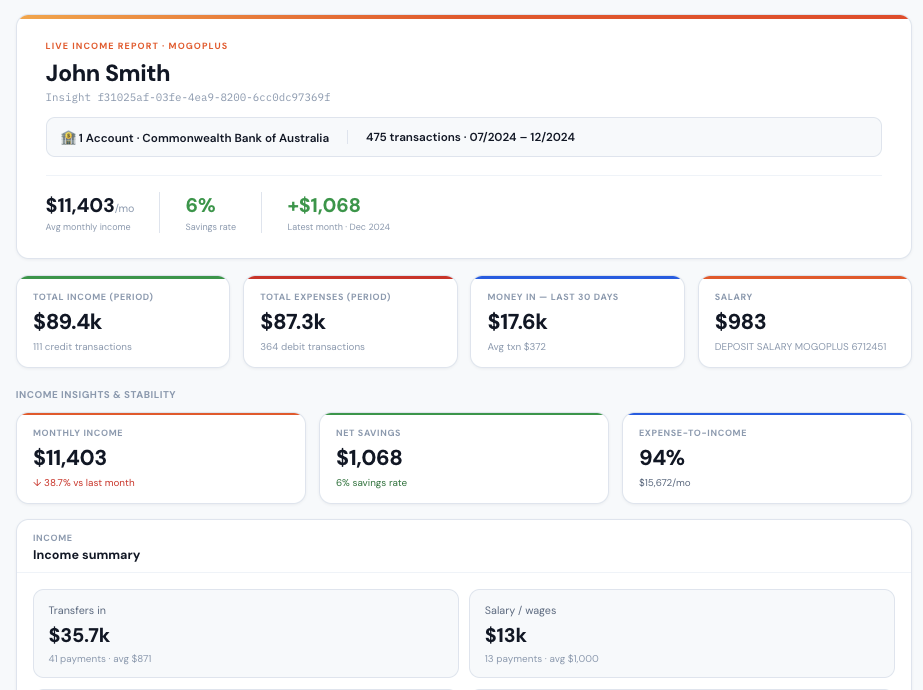
The report opens with a panel showing the applicant's name, reference number, linked bank account, transaction count, and date range.

<figure><img src="https://1043977358-files.gitbook.io/~/files/v0/b/gitbook-x-prod.appspot.com/o/spaces%2FLh8rfYO4feYy9OXJ36Cq%2Fuploads%2Ft6S1G6HkJpVCUu2p6Okj%2Fimage.png?alt=media&amp;token=05ccf031-1948-4277-83d2-17526fbc9c1c" alt=""><figcaption></figcaption></figure>

Alternatively, as mentioned in **Step 2**, you can also access three pre-built sample reports to get a quick overview of the **GoLend report**.

<figure><img src="https://1043977358-files.gitbook.io/~/files/v0/b/gitbook-x-prod.appspot.com/o/spaces%2FLh8rfYO4feYy9OXJ36Cq%2Fuploads%2F5pVJ7JWbJ49rq5lgOj6P%2Fimage.png?alt=media&amp;token=a06fbf29-5d54-49a1-91eb-97440662240b" alt=""><figcaption></figcaption></figure>


# Categorise your way

Here you can understand how to modify/update the default categories to the categories that you need and a lot more

### Review/Modify categories (Optional exercise)

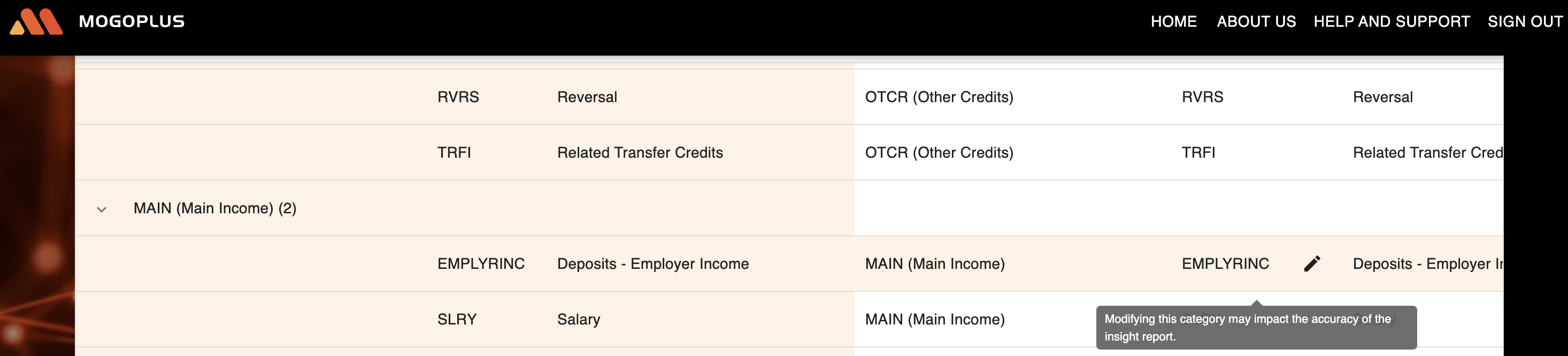
Choose the category/row you would like to change

<figure><img src="https://content.gitbook.com/content/Lh8rfYO4feYy9OXJ36Cq/blobs/vwf9ZfiuIR7BpVWzsxw8/image.png" alt=""><figcaption></figcaption></figure>

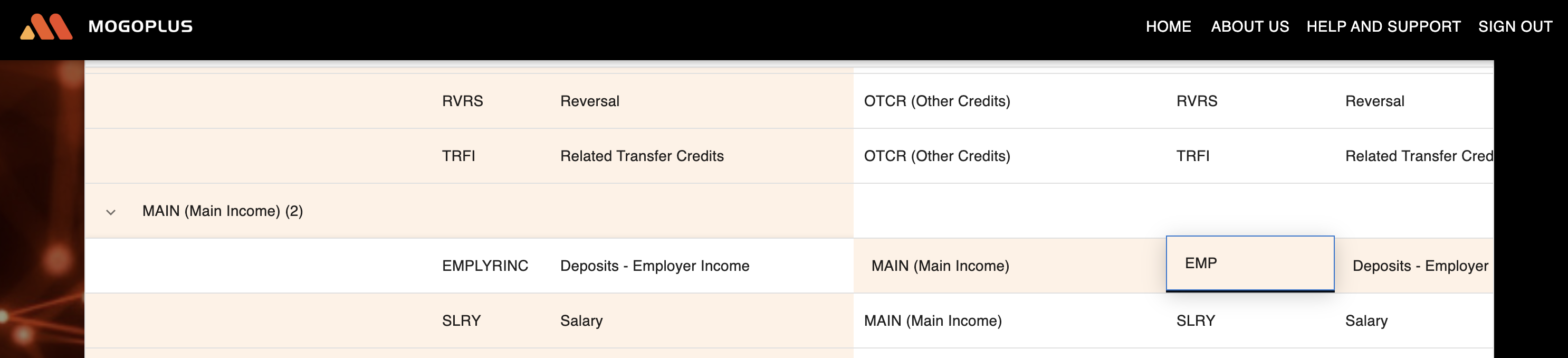
Click on the edit icon and change the category name to the name you need

<figure><img src="https://content.gitbook.com/content/Lh8rfYO4feYy9OXJ36Cq/blobs/vuskxjCyUx8lLwWdoDJw/image.png" alt=""><figcaption></figcaption></figure>

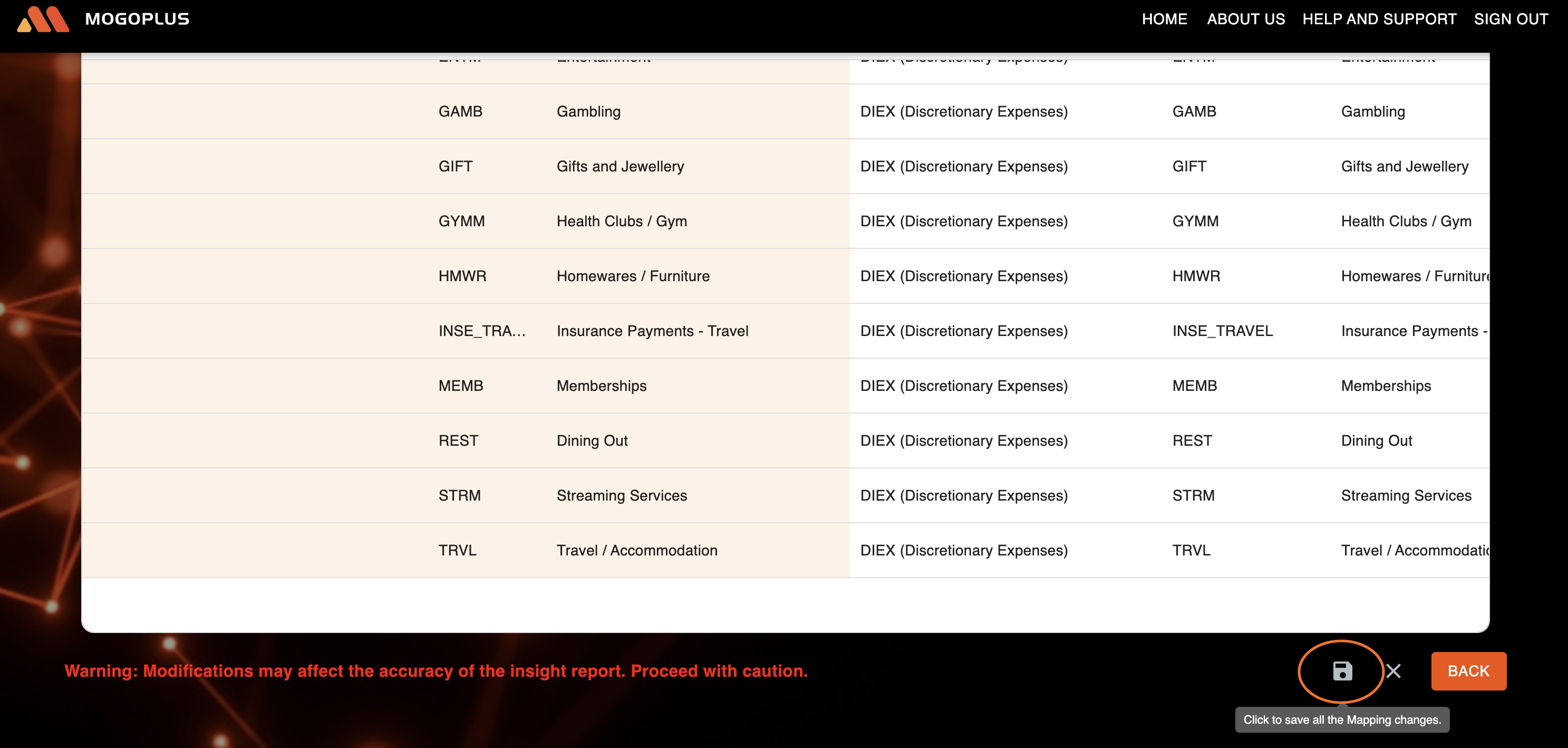
Scroll down to the bottom of page and click Save

<figure><img src="https://content.gitbook.com/content/Lh8rfYO4feYy9OXJ36Cq/blobs/jZaYrUpD28boVCoYxPAT/image.png" alt=""><figcaption></figcaption></figure>

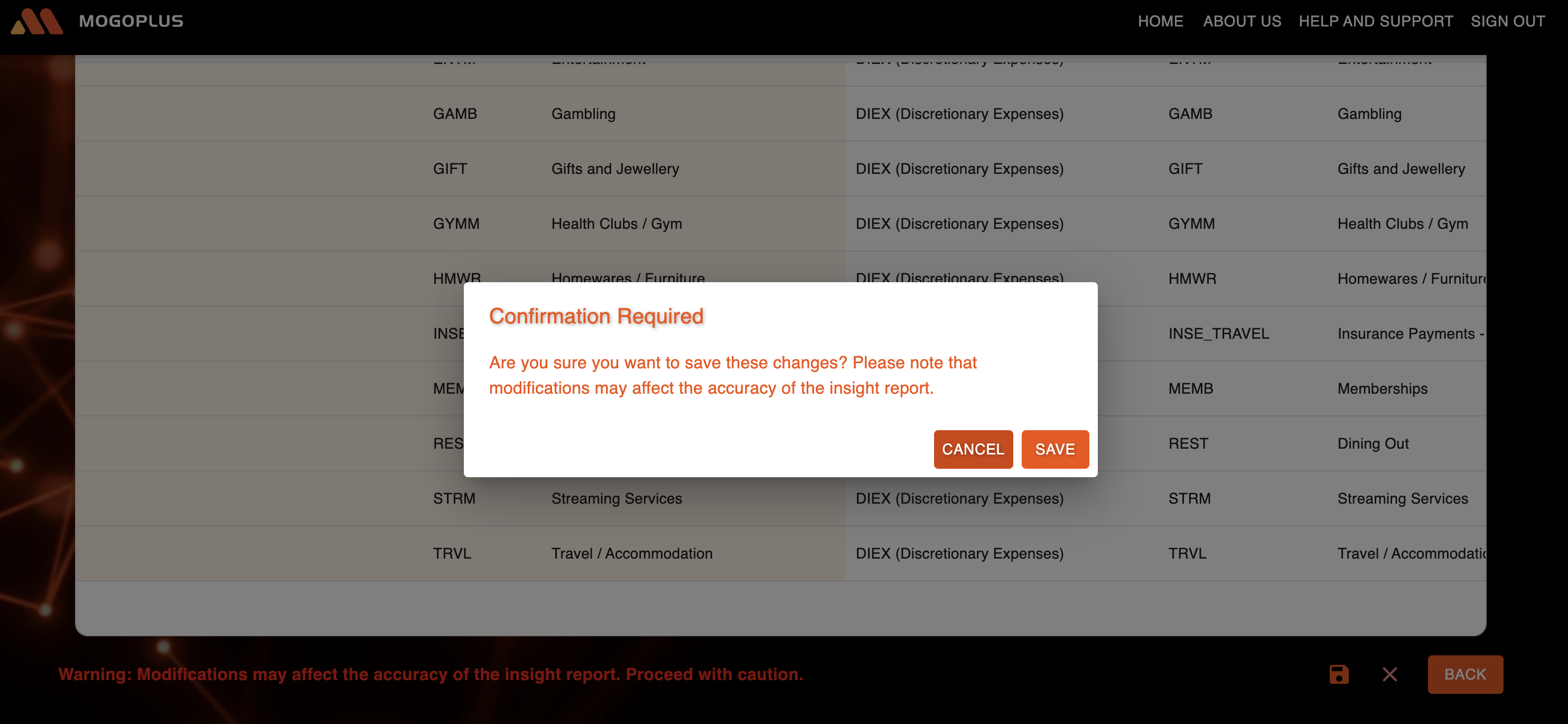
Click "Save" on the confirmation pop-up

<figure><img src="https://content.gitbook.com/content/Lh8rfYO4feYy9OXJ36Cq/blobs/2dm3UxQczq1qBJzG1Ft8/image.png" alt=""><figcaption></figcaption></figure>

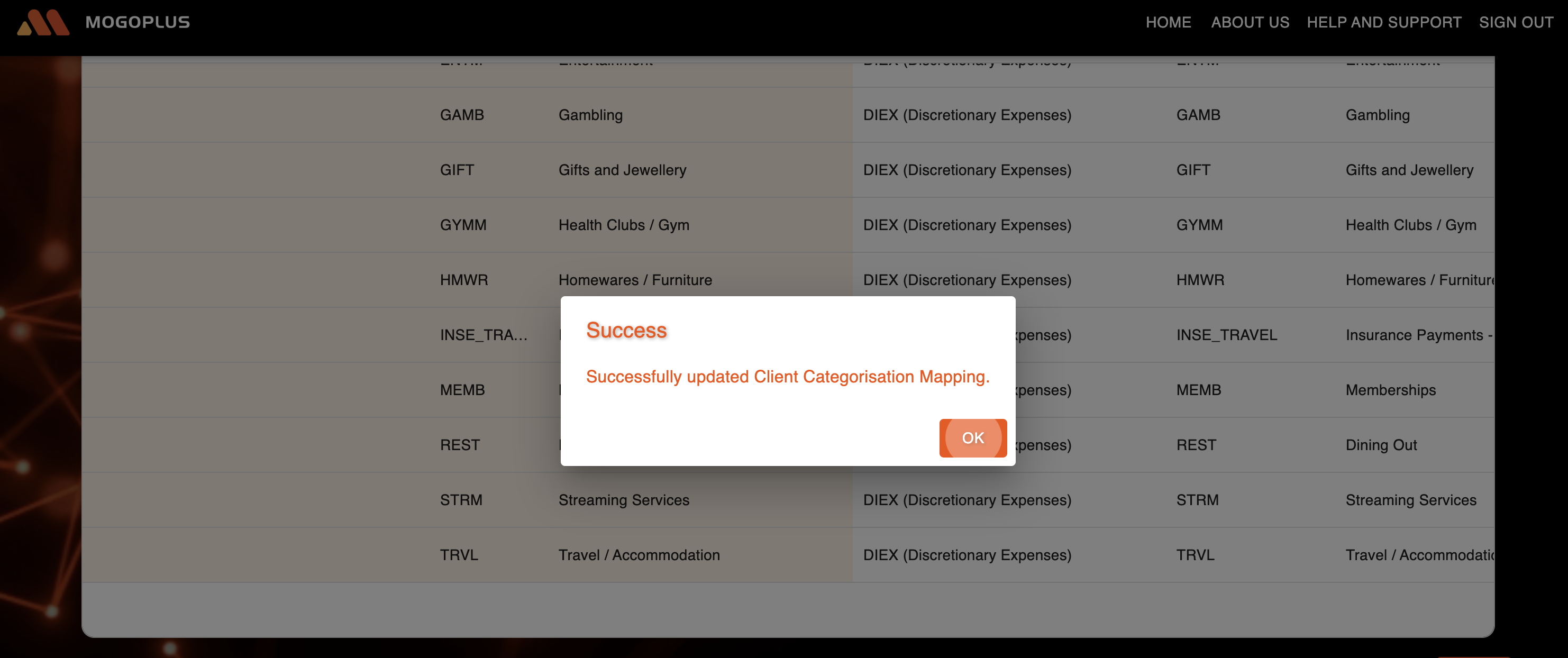
Client Categorisation mapping will be updated

<figure><img src="https://content.gitbook.com/content/Lh8rfYO4feYy9OXJ36Cq/blobs/ksGMCrj5qlk1XXSDXIxm/Screenshot%202025-02-12%20at%204.26.40%20pm.png" alt=""><figcaption></figcaption></figure>

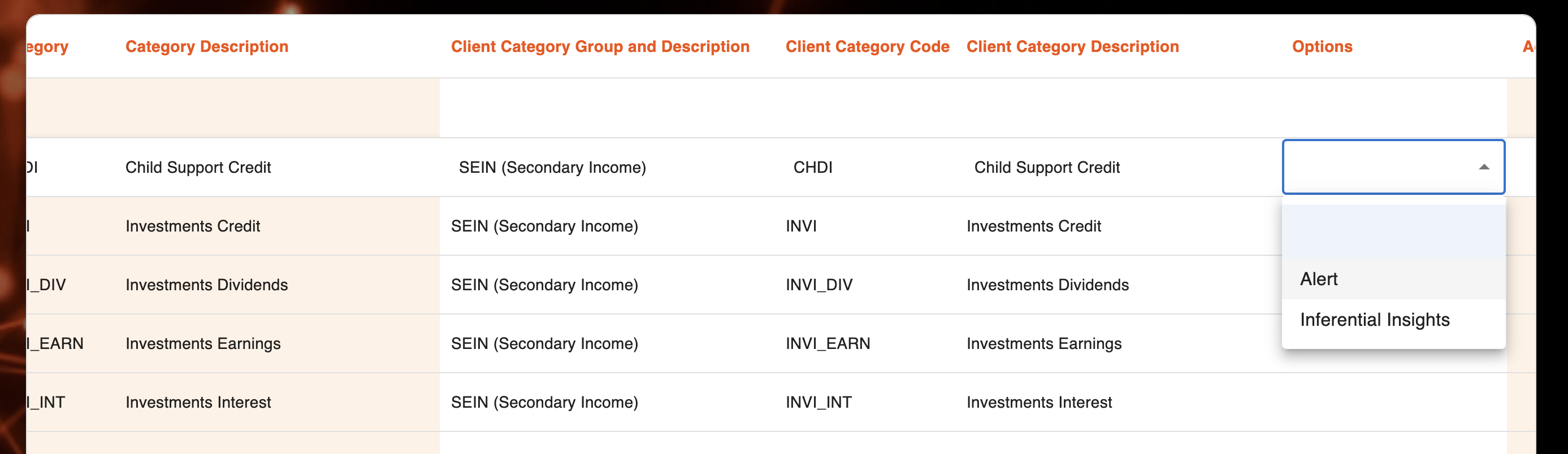
**Note**: If the product is other than GoCat, you will see additional options to update the category mapping and the corresponding insights.

<figure><img src="https://content.gitbook.com/content/Lh8rfYO4feYy9OXJ36Cq/blobs/huLEaEQfiDPh5kiLzSZY/image.png" alt=""><figcaption></figcaption></figure>


# User Management

Here are a few key points on how to create, edit, or delete a new user (Admin):

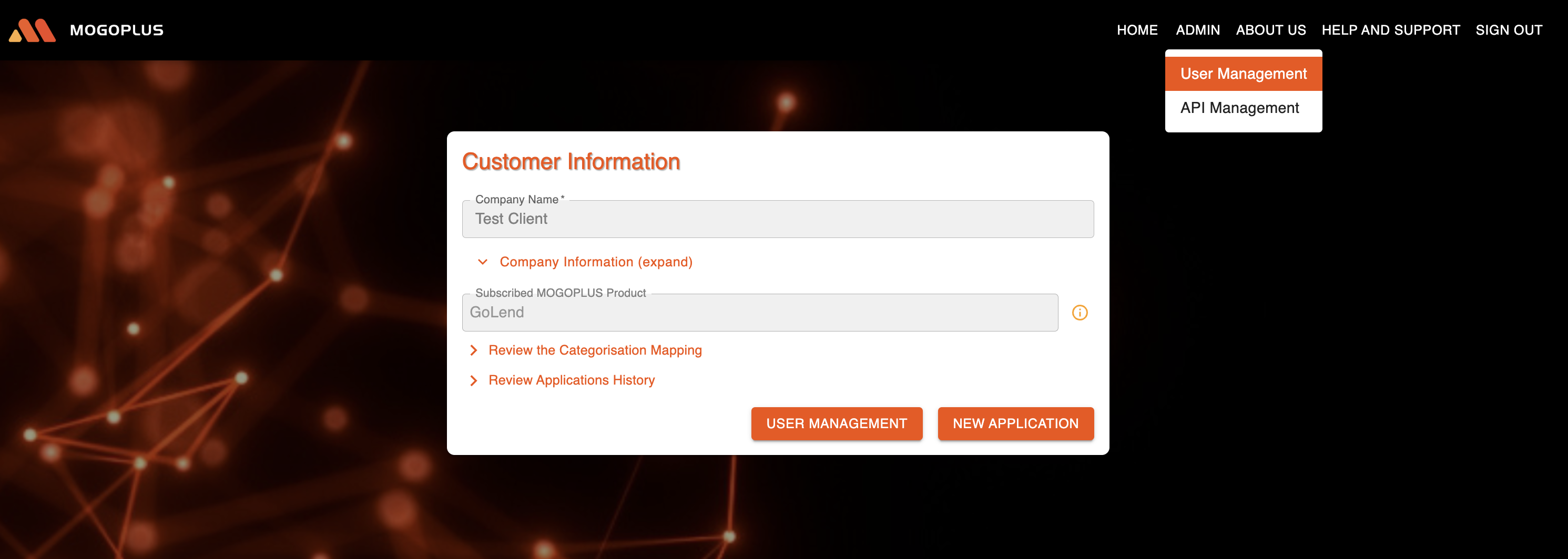
If you are an Admin, you will be able to see "USER MANAGEMENT" button on MOGOPLUS homepage.

{% hint style="info" %}
Please note that the **'USER MANAGEMENT'** button will appear on the home page only during your ***first*** sign-in. For subsequent sign-ins, to access the **User Management** feature, click on **'ADMIN'** and then select **'User Management'**
{% endhint %}

<figure><img src="https://content.gitbook.com/content/Lh8rfYO4feYy9OXJ36Cq/blobs/l0pYQj5WctvqYOijDYbx/image.png" alt=""><figcaption><p>Manage users</p></figcaption></figure>

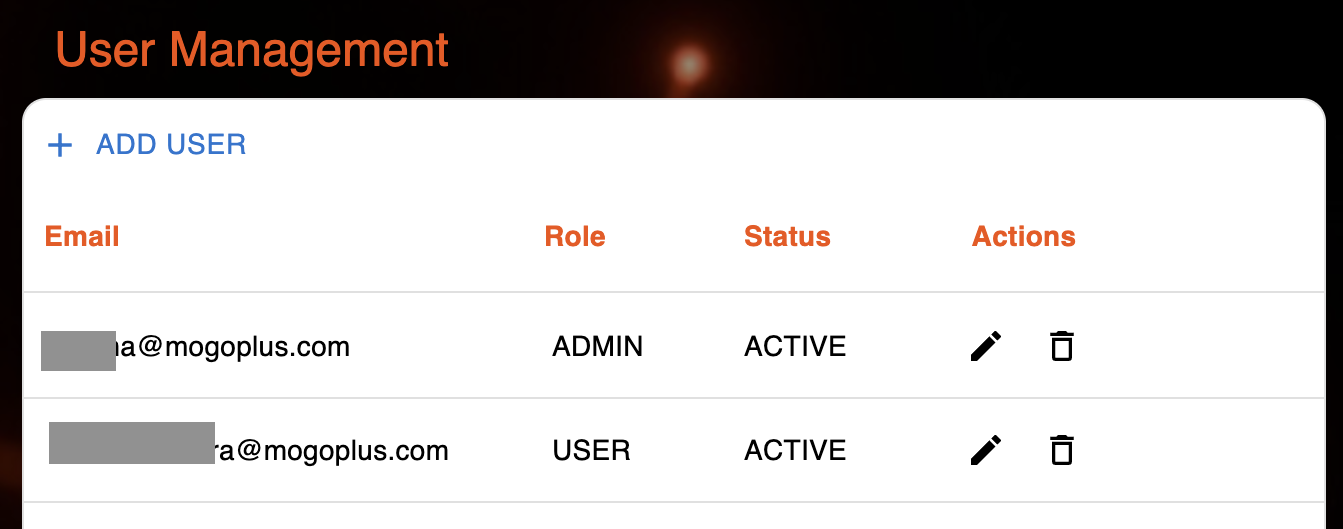
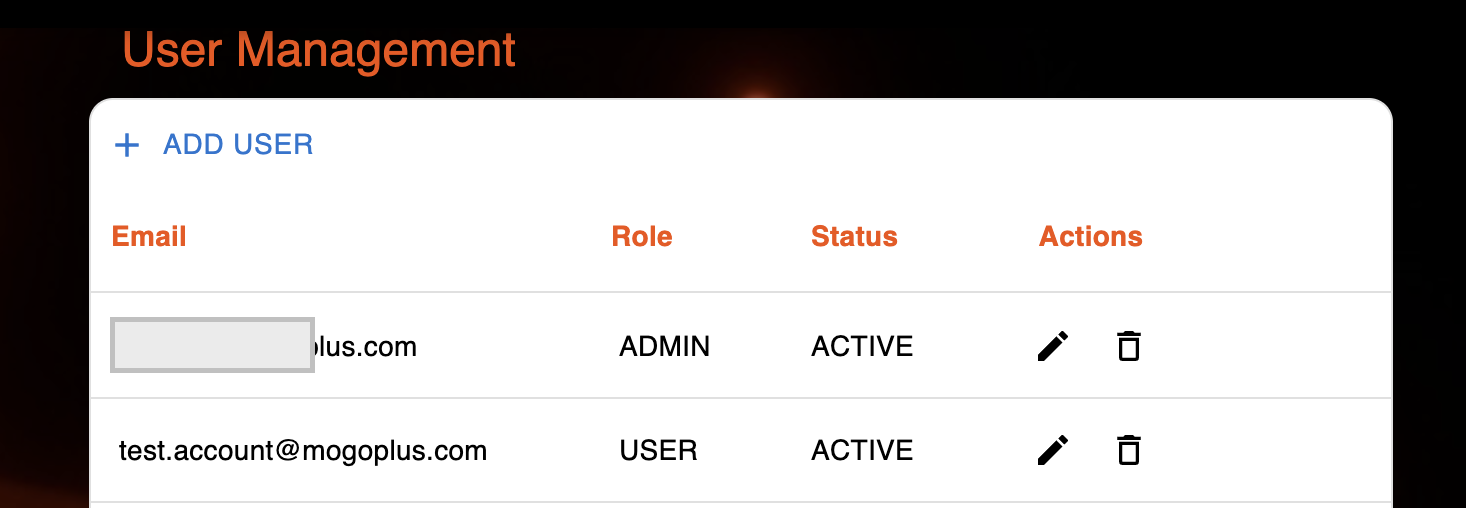
Upon clicking "User Management" button, an Admin will be able to view the existing users registered against the organisation

<figure><img src="https://content.gitbook.com/content/Lh8rfYO4feYy9OXJ36Cq/blobs/Glczu5xllVBbd7qHFRQF/Screenshot%202025-02-26%20at%2010.30.47%20pm.png" alt=""><figcaption><p>View or update registered users</p></figcaption></figure>

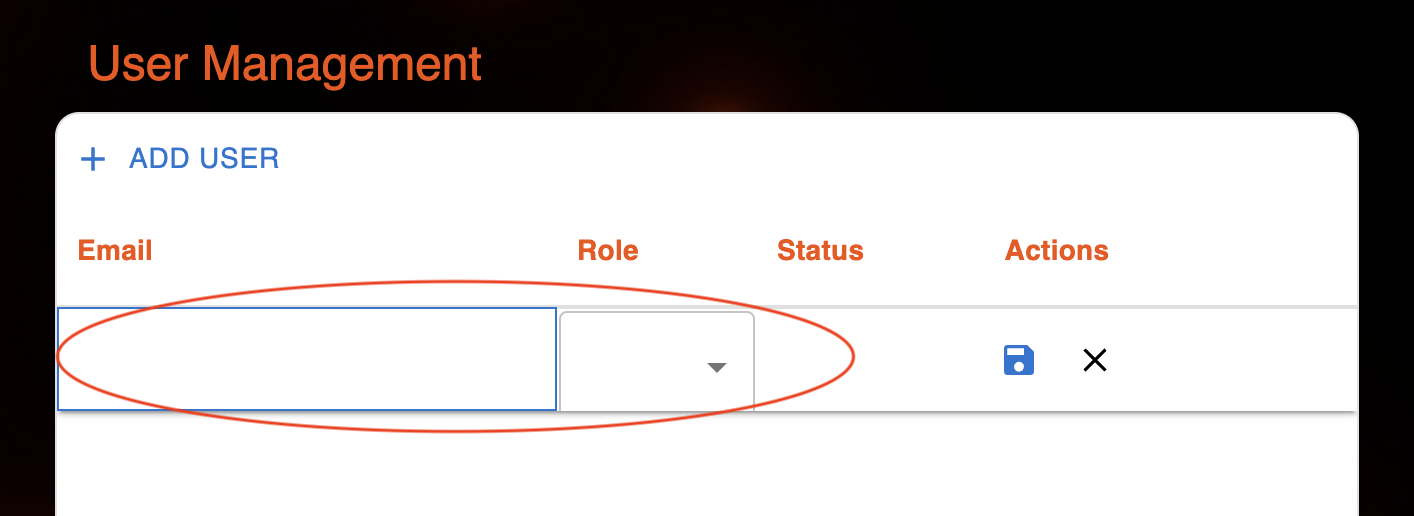
Admin can add a new user by clicking "ADD USER". A new row will be available.

***Note***: Currently, an admin can add only up to five users, and a maximum of six active users are allowed per organisation at any given time. Also the number of Admins can only be three.

<figure><img src="https://content.gitbook.com/content/Lh8rfYO4feYy9OXJ36Cq/blobs/c6VdZTKctfUhA5Sl1lC3/Screenshot%202025-02-26%20at%2010.52.41%20pm.png" alt=""><figcaption><p>Create a new user</p></figcaption></figure>

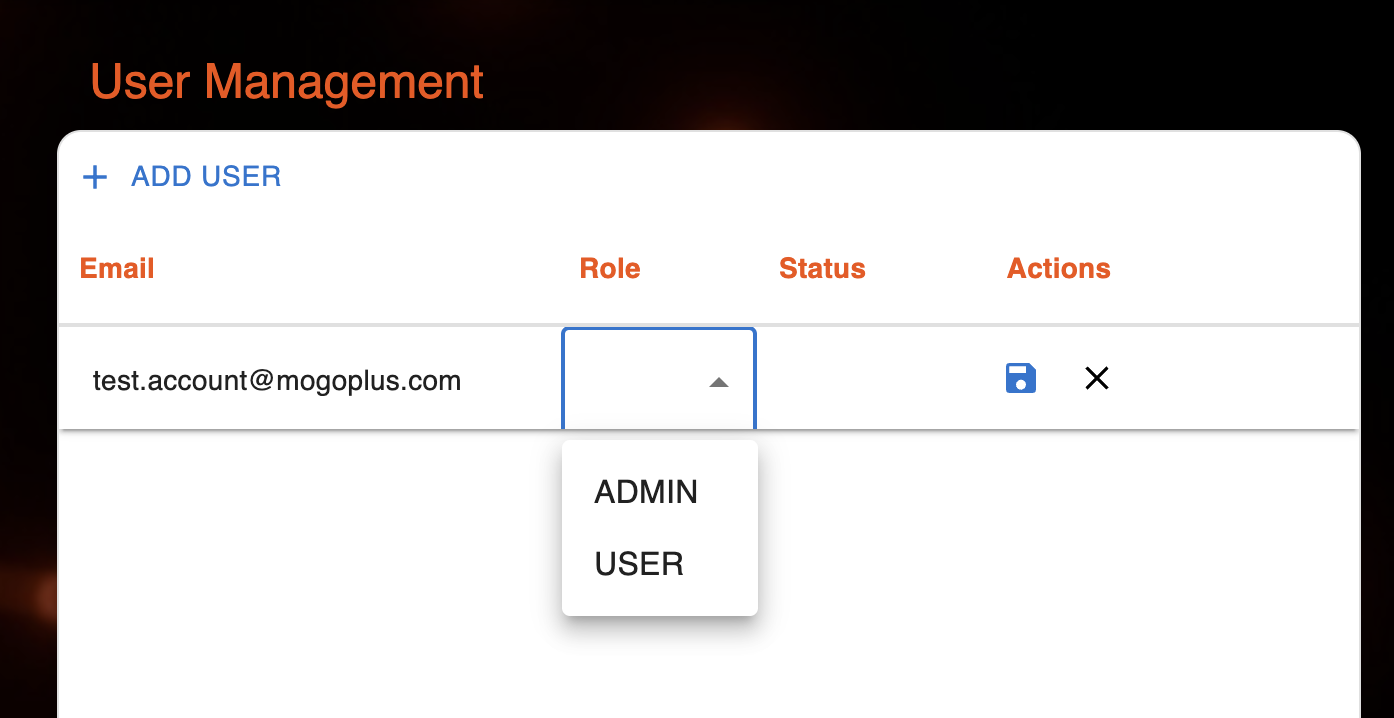
Enter a valid email address and choose the role(Admin/User). Hit Save button to add the user.&#x20;

***Note***: The email domain of new user must be the same as the admin's email domain.

<figure><img src="https://content.gitbook.com/content/Lh8rfYO4feYy9OXJ36Cq/blobs/7pHB7712J4evjwpNAji9/image.png" alt=""><figcaption><p>Enter email address and choose a role to add an user</p></figcaption></figure>

A success message will be shown once the user gets created successfully.

<figure><img src="https://content.gitbook.com/content/Lh8rfYO4feYy9OXJ36Cq/blobs/VMFqQnHQUQ3eRUkSn2t8/image.png" alt=""><figcaption><p>User is created successfully</p></figcaption></figure>

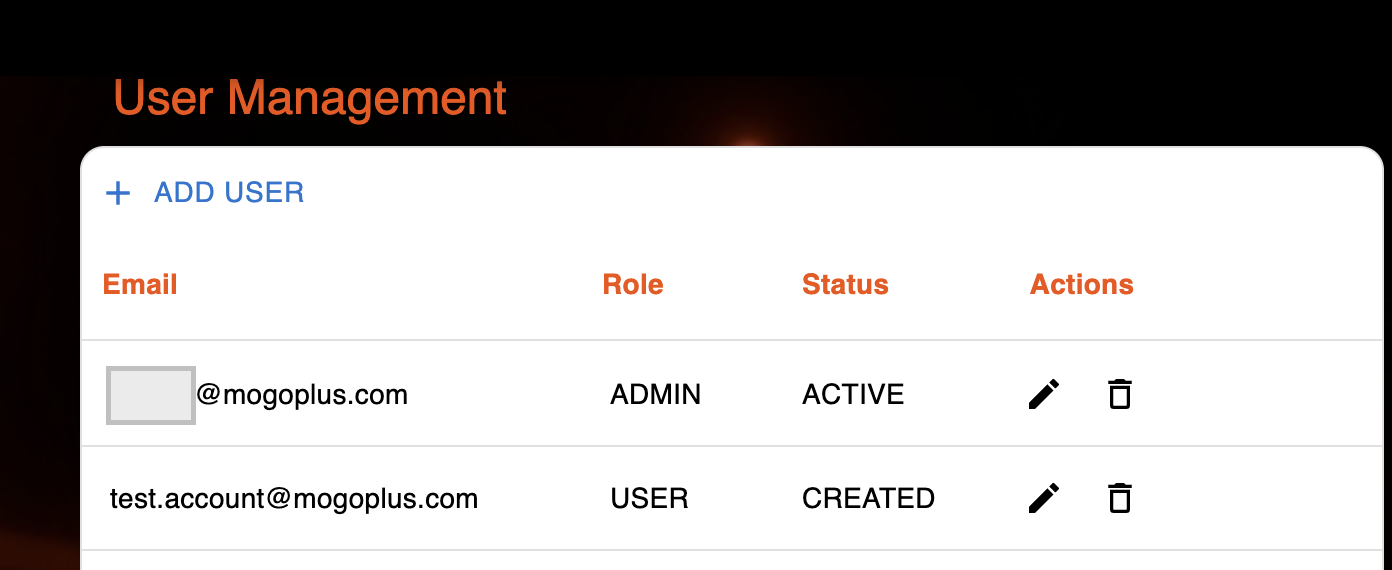
A user's status changes to **ACTIVE** upon successful signup.

<figure><img src="https://content.gitbook.com/content/Lh8rfYO4feYy9OXJ36Cq/blobs/5cKXLXRNKKsOWnLbAzlE/image.png" alt=""><figcaption><p>Upon signup, status of user becomes Active</p></figcaption></figure>


# Basics

Here you will find the key information related to the APIs.

## MOGOPLUS API Documentation&#x20;

### 1. Introduction

MOGOPLUS provides HTTP APIs for its services. This document outlines the basic information needed to interact with our api.

### 2. API Endpoints&#x20;

Our API service includes two main endpoints:

1. **Authentication** – Used to generate the authentication token required for accessing the APIs.
2. **Insight/Report Generation** – Processes transactional data to generate insights.

To use the Insight/Report Generation endpoint, you must first obtain an authentication token by calling the Authentication endpoint.

#### 2.1 Authentication API&#x20;

Details on authentication methods and requirements are provided [here](https://docs.mogoplus.ai/sandbox/api-reference/authentication). Ensure you have the necessary credentials before attempting to access these APIs.

More information regarding how to get the necessary credentials is listed [here](https://docs.mogoplus.ai/sandbox/instructions/api-management)

#### 2.2 Insights API&#x20;

<https://docs.mogoplus.ai/sandbox/api-reference/api-endpoints>

### 3. Next Steps

For detailed information on available endpoints, request/response formats, and more, refer to our comprehensive API documentation available [here](https://docs.mogoplus.ai/api-reference/api-endpoints).


# Authentication

This endpoint is provided to allow Google marketplace participants to fetch their access token from MOGOPLUS by passing the required Authorization details.

{% hint style="danger" %}
The client\_id  and client\_secret, which are required to invoke the Authentication API can be generated from Mogoplus console. More information available [here](https://docs.mogoplus.ai/api-management)
{% endhint %}

## How to Authenticate?

* As mentioned above, get the client id and secret from MOGOPLUS console
* Form the request as mentioned below using the above details and send
* You should receive a Bearer token in response to the request

## Login

<mark style="color:green;">`POST/`</mark>`https://auth.dev.mogoplus.ai/api/v1/oauth2/token?grant_type=client_credentials`

Invoke the API over mTLS and fetch access token from MOGOPLUS to prove the authenticity of requests

**Headers**

| Name         | Value                             |
| ------------ | --------------------------------- |
| Content-Type | application/x-www-form-urlencoded |
| Accept       | application/json                  |

**Form-data**

| Name            | Value                                                        |
| --------------- | ------------------------------------------------------------ |
| `client_id`     | {generated from user management section in Mogoplus console} |
| `client_secret` | {generated from user management section in Mogoplus console} |

**Parameters**

| Name        | Value               |
| ----------- | ------------------- |
| grant\_type | client\_credentials |

**Response**

{% tabs %}
{% tab title="200" %}

```json
{
    "access_token": "eyJraWQiOiI0ZDIyZTlhMy1hNTcyMKD85Nz3kco6EHxYfTk",
    "token_type": "Bearer",
    "expires_in": 35999
}
```

{% endtab %}

{% tab title="400" %}

```json
{
    "error_description": "OAuth 2.0 Parameter: grant_type",
    "error": "unsupported_grant_type",
    "error_uri": "https://datatracker.ietf.org/doc/html/rfc6749#section-5.2"
}
```

{% endtab %}

{% tab title="401" %}

```json
{
    "error": "invalid_client"
}
```

{% endtab %}
{% endtabs %}


# API Endpoints

The below provides developers with essential information on how to integrate and interact with the API, covering key methods, data formats, request/response structures, and error handling protocols.

{% hint style="warning" %}
Few important points regarding the date and amount fields in the request payload:

1. Supported date formats are DD/MM/YYYY, YYYYMMDD or YYYY-MM-DD
2. Debit amounts are indicated with a negative (-) sign
   {% endhint %}

## Send banking transaction data for insights analysis

> This endpoint is provided to allows customers to send MogoPlus banking data in a single payload. MogoPlus does not set bounds on the data submitted, so API consumers can submit the data pertinent to their needs. If a given dataset is not required for insights analysis - for example, balances is not required - the data can simply be omitted. The minimum requirements will, however is account and transaction data, which must be supplied for meaningful analysis to take place. API consumers can submit data from multiple applicants or across multiple accounts in a single request.<br>

```json
{"openapi":"3.0.3","info":{"title":"MogoPlus CaaS API","version":"0.0.1"},"tags":[{"name":"Banking Data","description":"Banking-related data, including balances and transactions"}],"servers":[{"description":"PROD Server","url":"https://console.live.mogoplus.ai"}],"security":[{"bearerAuth":[]}],"components":{"securitySchemes":{"bearerAuth":{"type":"http","scheme":"bearer","bearerFormat":"JWT"}},"schemas":{"applicantsData":{"type":"array","items":{"$ref":"#/components/schemas/applicationData"}},"applicationData":{"type":"object","properties":{"applicant":{"$ref":"#/components/schemas/applicantCreateProperties"},"bankingTransactionData":{"type":"object","properties":{"institutions":{"type":"array","items":{"type":"object","properties":{"institutionName":{"type":"string"},"accounts":{"type":"array","items":{"type":"object","properties":{"accountNumber":{"type":"string"},"transactions":{"type":"array","items":{"type":"object","properties":{"description":{"type":"string"},"amount":{"type":"number"},"date":{"type":"string"}}}}}}}}}}}}}},"applicantCreateProperties":{"description":"Properties of the banking customer not available in input data","type":"object","properties":{"firstName":{"description":"First name of applicant","type":"string","minLength":1,"maxLength":255,"pattern":"^[a-zA-Z]+(?: |-|)[a-zA-Z]+$"},"lastName":{"description":"Last name of applicant","type":"string","minLength":1,"maxLength":255,"pattern":"^[a-zA-Z]+(?: |-|)[a-zA-Z]+$"},"employerNames":{"type":"array","items":{"type":"string","minLength":1,"maxLength":50},"description":"Employers Name list of a applicant"}},"additionalProperties":false},"insightsIdOrderType":{"description":"Insights ID object","type":"object","required":["insightsId"],"properties":{"insightsId":{"$ref":"#/components/schemas/insightsId"},"insightsReport":{"$ref":"#/components/schemas/insightsIdWithOrders"}}},"insightsId":{"description":"Insights ID object","type":"object","required":["insightsId"],"properties":{"insightsId":{"$ref":"#/components/schemas/insightsIdType"}}},"insightsIdType":{"$ref":"#/components/schemas/uuidV4"},"uuidV4":{"description":"A valid V4 UUID","type":"string","pattern":"^[0-9a-f]{8}-[0-9a-f]{4}-[0-5][0-9a-f]{3}-[089ab][0-9a-f]{3}-[0-9a-f]{12}$"},"insightsIdWithOrders":{"description":"Orders associated with a insight record","type":"object","properties":{"subscriptionId":{"type":"string"},"report":{"description":"The URL for this data insight","type":"string","pattern":"^http(s|):\\/\\/.*\\/banking-data-insights\\/.+$"}}},"httpErrorResponse":{"type":"object","required":["code","detail","title"],"properties":{"code":{"description":"The code of the error encountered. Where the error is specific to the respondent, an application-specific error code, expressed as a string value. If the error is application-specific, the URN code that the specific error extends must be provided in the meta object. Otherwise, the value is the error code URN.","type":"string"},"title":{"description":"A short, human-readable summary of the problem that MUST NOT change from occurrence to occurrence of the problem represented by the error code.","type":"string"},"detail":{"description":"A human-readable explanation specific to this occurrence of the problem.","type":"string"}}}},"responses":{"badRequest":{"description":"Invalid input or arguments","content":{"application/json":{"schema":{"$ref":"#/components/schemas/httpErrorResponse"}}}},"unauthorized":{"description":"Invalid credentials","content":{"application/json":{"schema":{"$ref":"#/components/schemas/httpErrorResponse"}}}},"forbidden":{"description":"Credentials are valid but access to the resource is forbidden due to access controls. Access must be granted for this request to succeed","content":{"application/json":{"schema":{"$ref":"#/components/schemas/httpErrorResponse"}}}},"methodNotSupported":{"description":"Unsupported HTTP method sent","content":{"application/json":{"schema":{"$ref":"#/components/schemas/httpErrorResponse"}}}},"notAcceptable":{"description":"Requested content type is not supported by this API","content":{"application/json":{"schema":{"$ref":"#/components/schemas/httpErrorResponse"}}}},"unprocessableEntity":{"description":"Request cannot be processed by the API as the content contains errors","content":{"application/json":{"schema":{"$ref":"#/components/schemas/httpErrorResponse"}}}},"tooManyRequests":{"description":"The API has receive too many requests from the client and is rate-limiting further requests based on published limits","content":{"application/json":{"schema":{"$ref":"#/components/schemas/httpErrorResponse"}}}},"internalServerError":{"description":"API encountered an error processing the request","content":{"application/json":{"schema":{"$ref":"#/components/schemas/httpErrorResponse"}}}},"serviceUnavailable":{"description":"The API is not currently available due a transient network error, internal service error or planned outage","content":{"application/json":{"schema":{"$ref":"#/components/schemas/httpErrorResponse"}}}}}},"paths":{"/api/application":{"post":{"summary":"Send banking transaction data for insights analysis","description":"This endpoint is provided to allows customers to send MogoPlus banking data in a single payload. MogoPlus does not set bounds on the data submitted, so API consumers can submit the data pertinent to their needs. If a given dataset is not required for insights analysis - for example, balances is not required - the data can simply be omitted. The minimum requirements will, however is account and transaction data, which must be supplied for meaningful analysis to take place. API consumers can submit data from multiple applicants or across multiple accounts in a single request.\n","tags":["Banking Data"],"requestBody":{"description":"Account data supplied by customer, relating to one-or-more accounts held by the customer","content":{"application/json":{"schema":{"description":"Banking data supplied by customer participant","type":"object","properties":{"applicantsData":{"$ref":"#/components/schemas/applicantsData"}},"additionalProperties":false}}}},"responses":{"201":{"description":"Data received successfully and accepted for processing The `insightsId` value is provided for tracking the insights request and retrieving the request from `/banking-data-insights`.\n","content":{"application/json":{"schema":{"type":"object","required":["data","links"],"properties":{"data":{"allOf":[{"$ref":"#/components/schemas/insightsIdOrderType"}]},"links":{"type":"object","required":["self"],"properties":{"self":{"description":"The URL for this data insight","type":"string","pattern":"^http(s|):\\/\\/.*\\/application\\/.+$"}}}}}}}},"400":{"$ref":"#/components/responses/badRequest"},"401":{"$ref":"#/components/responses/unauthorized"},"403":{"$ref":"#/components/responses/forbidden"},"405":{"$ref":"#/components/responses/methodNotSupported"},"406":{"$ref":"#/components/responses/notAcceptable"},"422":{"$ref":"#/components/responses/unprocessableEntity"},"429":{"$ref":"#/components/responses/tooManyRequests"},"500":{"$ref":"#/components/responses/internalServerError"},"503":{"$ref":"#/components/responses/serviceUnavailable"}}}}}}
```

## Retrieve the banking data insights report

> This endpoint provides the insights report. If processing is ongoing the endpoint will return a \`204\` to indicate no data is available.<br>

```json
{"openapi":"3.0.3","info":{"title":"MogoPlus CaaS API","version":"0.0.1"},"tags":[{"name":"Banking Data","description":"Banking-related data, including balances and transactions"}],"servers":[{"description":"PROD Server","url":"https://console.live.mogoplus.ai"}],"security":[{"bearerAuth":[]}],"components":{"securitySchemes":{"bearerAuth":{"type":"http","scheme":"bearer","bearerFormat":"JWT"}},"parameters":{"applicationId":{"name":"applicationId","in":"path","description":"The identifier for a given application submission and the resultant insights aggregated reports","required":true,"schema":{"$ref":"#/components/schemas/resourceId"}}},"schemas":{"resourceId":{"$ref":"#/components/schemas/uuidV4"},"uuidV4":{"description":"A valid V4 UUID","type":"string","pattern":"^[0-9a-f]{8}-[0-9a-f]{4}-[0-5][0-9a-f]{3}-[089ab][0-9a-f]{3}-[0-9a-f]{12}$"},"bankingDataInsightsReport":{"description":"Provides both the state of processing and the response data. Whilst processing is ongoing the `data` object will be omitted.\n","type":"object","required":["insightsHeader","reportString"],"properties":{"insightsHeader":{"type":"object","properties":{"insightsId":{"$ref":"#/components/schemas/insightsIdType"},"insightsPublishDate":{"type":"string"},"clientId":{"type":"string"},"clientName":{"type":"string"},"reports":{"type":"array","items":{"$ref":"#/components/schemas/insightsDataforOrder"}}}},"reportString":{"type":"string"}}},"insightsIdType":{"$ref":"#/components/schemas/uuidV4"},"insightsDataforOrder":{"type":"object","properties":{"reportHeader":{"$ref":"#/components/schemas/reportHeader"},"combinedSummary":{"$ref":"#/components/schemas/combinedSummary"},"applicantSummary":{"$ref":"#/components/schemas/applicantSummary"},"incomeSummary":{"$ref":"#/components/schemas/incomeSummary"}}},"reportHeader":{"type":"object","properties":{"reportId":{"type":"string"},"reportPublishDate":{"type":"string"},"applicationType":{"type":"string"},"numberOfApplicants":{"type":"number"},"applicants":{"type":"array","items":{"type":"object","properties":{"applicantId":{"type":"string"},"applicantName":{"type":"string"}}}}}},"combinedSummary":{"type":"object","description":"aggregated summary data for all applicants in this application","properties":{"combinedNumberOfInstitutions":{"type":"number"},"combinedNumberOfAccounts":{"type":"number"},"combinedNumberOfTransactions":{"type":"number"},"currency":{"type":"string"},"combinedTotalSummary":{"$ref":"#/components/schemas/totalSummary"},"combinedCategoryGroupSummary":{"type":"object","properties":{"combinedCategoryGroups":{"$ref":"#/components/schemas/categoryGroups"}}},"combinedCategorySummary":{"type":"object","properties":{"combined":{"$ref":"#/components/schemas/categories"}}},"netMonthlyPosition":{"type":"object","additionalProperties":{"type":"string"}},"combinedIncomeInsights":{"type":"object","properties":{"basicIncomeInsights":{"$ref":"#/components/schemas/basicIncomeInsights"}}}}},"totalSummary":{"type":"object","properties":{"credit":{"type":"object","properties":{"sumAmount":{"type":"number"},"numberOfTransactions":{"type":"number"},"Average":{"type":"number"}}},"debit":{"type":"object","properties":{"sumAmount":{"type":"number"},"numberOfTransactions":{"type":"number"},"Average":{"type":"number"}}}}},"categoryGroups":{"type":"array","items":{"$ref":"#/components/schemas/categoryGroupItem"}},"categoryGroupItem":{"type":"object","properties":{"categoryGroup":{"type":"string"},"categoryGroupDescription":{"type":"string"},"debit":{"type":"object","properties":{"sumAmount":{"type":"number"},"numberOfTransactions":{"type":"number"},"Average":{"type":"number"}}},"credit":{"type":"object","properties":{"sumAmount":{"type":"number"},"numberOfTransactions":{"type":"number"},"Average":{"type":"number"}}}}},"categories":{"type":"array","items":{"$ref":"#/components/schemas/categoryItem"}},"categoryItem":{"type":"object","properties":{"categoryCode":{"type":"string"},"categoryCodeDescription":{"type":"string"},"credit":{"type":"object","properties":{"sumAmount":{"type":"number"},"numberOfTransactions":{"type":"number"},"Average":{"type":"number"}}},"debit":{"type":"object","properties":{"sumAmount":{"type":"number"},"numberOfTransactions":{"type":"number"},"Average":{"type":"number"}}}}},"basicIncomeInsights":{"type":"object","properties":{"currency":{"type":"string"},"income":{"type":"object","properties":{"sumAmount":{"type":"number"},"numberOfTransactions":{"type":"number"},"averageMonthly":{"type":"number"}}},"incomeBuckets":{"type":"object","additionalProperties":{"type":"string"}}}},"applicantSummary":{"type":"object","description":"summary data for applicants","properties":{"applicants":{"type":"array","items":{"$ref":"#/components/schemas/applicantSummaryData"}}}},"applicantSummaryData":{"type":"object","properties":{"applicantName":{"type":"string"},"numberOfInstitutions":{"type":"number"},"numberOfAccounts":{"type":"number"},"numberOfTransactions":{"type":"number"},"currency":{"type":"string"},"applicantTotalSummary":{"$ref":"#/components/schemas/totalSummary"},"applicantCategoryGroupSummary":{"type":"object","properties":{"applicantCategoryGroups":{"$ref":"#/components/schemas/categoryGroups"}}},"applicantCategorySummary":{"type":"object","properties":{"categories":{"$ref":"#/components/schemas/categories"}}},"applicantDetailedTransaction":{"type":"object","properties":{"institutions":{"type":"array","items":{"$ref":"#/components/schemas/institution"}}}},"netMonthlyPosition":{"type":"object","additionalProperties":{"type":"string"}},"categoryReview":{"type":"array","items":{"type":"object","properties":{"categoryCode":{"type":"string"},"categoryCodeDescription":{"type":"string"},"credit":{"type":"object","properties":{"sumAmount":{"type":"number"},"numberOfTransactions":{"type":"number"},"Average":{"type":"number"}}},"debit":{"type":"object","properties":{"sumAmount":{"type":"number"},"numberOfTransactions":{"type":"number"},"Average":{"type":"number"}}},"transactions":{"type":"array","items":{"$ref":"#/components/schemas/transaction"}}}}}}},"institution":{"type":"object","properties":{"institutionId":{"type":"string"},"institutionName":{"type":"string"},"accounts":{"type":"array","items":{"$ref":"#/components/schemas/account"}}}},"account":{"type":"object","properties":{"accountNumber":{"type":"string"},"accountName":{"type":"string"},"currentBalance":{"type":"number"},"availableBalance":{"type":"number"},"creditLimit":{"type":"number"},"numberOfTransactionsInTotal":{"type":"number"},"numberOfTransactionsCategorised":{"type":"number"},"transactions":{"type":"array","items":{"$ref":"#/components/schemas/transaction"}}}},"transaction":{"type":"object","properties":{"transactionId":{"type":"string"},"transactionDate":{"type":"string"},"transactionCategoryGroup":{"type":"string"},"transactionCategoryCode":{"type":"string"},"transactionDescription":{"type":"string"},"transactionAmount":{"type":"number"},"transactionCurrency":{"type":"string"}}},"incomeSummary":{"type":"object","description":"summary data of income for applicants","properties":{"applicants":{"type":"array","items":{"$ref":"#/components/schemas/incomeSummaryData"}}}},"incomeSummaryData":{"type":"object","properties":{"applicantName":{"type":"string"},"employmentInsights":{"type":"array","items":{"type":"object","properties":{"declaredEmployerName":{"type":"string"},"employerNameVerified":{"type":"boolean"},"latestEmployerVerifiedSalaryDate":{"type":"string"},"latestEmployerVerifiedSalaryAmount":{"type":"number"}}}},"IncomeInsights":{"type":"object","properties":{"basicIncomeInsights":{"$ref":"#/components/schemas/basicIncomeInsights"},"inferentialIncomeInsights":{"type":"array","items":{"type":"object","properties":{"type":{"type":"string"},"employer":{"type":"string"},"recency":{"type":"object","properties":{"daysInPriorMonth":{"type":"number"},"numberOfTransactionsInPriorMonth":{"type":"number"}}},"regularity":{"type":"object","properties":{"numberOfTransactions":{"type":"number"},"incomeDates":{"type":"array","items":{"type":"string"}},"statisticsOfDayIntervals":{"type":"object","properties":{"max":{"type":"number"},"min":{"type":"number"},"mean":{"type":"number"},"median":{"type":"number"},"mode":{"type":"number"},"standardDeviation":{"type":"number"}}}}},"reliability":{"type":"object","properties":{"numberOfTransactions":{"type":"number"},"incomeAmounts":{"type":"array","items":{"type":"object","properties":{"date":{"type":"string"},"amount":{"type":"number"}}}},"statisticsOfSalaryAmount":{"type":"object","properties":{"average":{"type":"number"},"median":{"type":"number"},"mode":{"type":"number"},"range":{"type":"number"},"standardDeviation":{"type":"number"}}}}}}}}}}}},"httpErrorResponse":{"type":"object","required":["code","detail","title"],"properties":{"code":{"description":"The code of the error encountered. Where the error is specific to the respondent, an application-specific error code, expressed as a string value. If the error is application-specific, the URN code that the specific error extends must be provided in the meta object. Otherwise, the value is the error code URN.","type":"string"},"title":{"description":"A short, human-readable summary of the problem that MUST NOT change from occurrence to occurrence of the problem represented by the error code.","type":"string"},"detail":{"description":"A human-readable explanation specific to this occurrence of the problem.","type":"string"}}}},"responses":{"partialContent":{"description":"partial response content, meaning inprogress","content":{"application/json":{"schema":{"$ref":"#/components/schemas/httpErrorResponse"}}}},"badRequest":{"description":"Invalid input or arguments","content":{"application/json":{"schema":{"$ref":"#/components/schemas/httpErrorResponse"}}}},"unauthorized":{"description":"Invalid credentials","content":{"application/json":{"schema":{"$ref":"#/components/schemas/httpErrorResponse"}}}},"forbidden":{"description":"Credentials are valid but access to the resource is forbidden due to access controls. Access must be granted for this request to succeed","content":{"application/json":{"schema":{"$ref":"#/components/schemas/httpErrorResponse"}}}},"methodNotSupported":{"description":"Unsupported HTTP method sent","content":{"application/json":{"schema":{"$ref":"#/components/schemas/httpErrorResponse"}}}},"notAcceptable":{"description":"Requested content type is not supported by this API","content":{"application/json":{"schema":{"$ref":"#/components/schemas/httpErrorResponse"}}}},"tooManyRequests":{"description":"The API has receive too many requests from the client and is rate-limiting further requests based on published limits","content":{"application/json":{"schema":{"$ref":"#/components/schemas/httpErrorResponse"}}}},"internalServerError":{"description":"API encountered an error processing the request","content":{"application/json":{"schema":{"$ref":"#/components/schemas/httpErrorResponse"}}}},"serviceUnavailable":{"description":"The API is not currently available due a transient network error, internal service error or planned outage","content":{"application/json":{"schema":{"$ref":"#/components/schemas/httpErrorResponse"}}}}}},"paths":{"/api/application/{applicationId}":{"get":{"summary":"Retrieve the banking data insights report","description":"This endpoint provides the insights report. If processing is ongoing the endpoint will return a `204` to indicate no data is available.\n","operationId":"RetrieveBankingDataInsights","tags":["Banking Data"],"parameters":[{"$ref":"#/components/parameters/applicationId"}],"responses":{"200":{"description":"The banking data insights report","content":{"application/json":{"schema":{"$ref":"#/components/schemas/bankingDataInsightsReport"}}}},"206":{"$ref":"#/components/responses/partialContent"},"400":{"$ref":"#/components/responses/badRequest"},"401":{"$ref":"#/components/responses/unauthorized"},"403":{"$ref":"#/components/responses/forbidden"},"405":{"$ref":"#/components/responses/methodNotSupported"},"406":{"$ref":"#/components/responses/notAcceptable"},"429":{"$ref":"#/components/responses/tooManyRequests"},"500":{"$ref":"#/components/responses/internalServerError"},"503":{"$ref":"#/components/responses/serviceUnavailable"}}}}}}
```


# CSV upload guide

Guidelines for the csv file structure

Below is a summary of the three columns used in the CSV file:

* **TRAN\_DATE**: The date of the transaction, formatted as DD/MM/YYYY, YYYYMMDD or YYYY-MM-DD
* **AMOUNT**: The transaction amount, with negative values indicating a debit.
* **NARRATIVE**: A description of the transaction.

You may use the sample csv file below as a reference point.

{% file src="/files/35A1wifgfmIQmJDuJ2Io" %}


# API Management

Helps you with the steps involved in getting the required api credentials

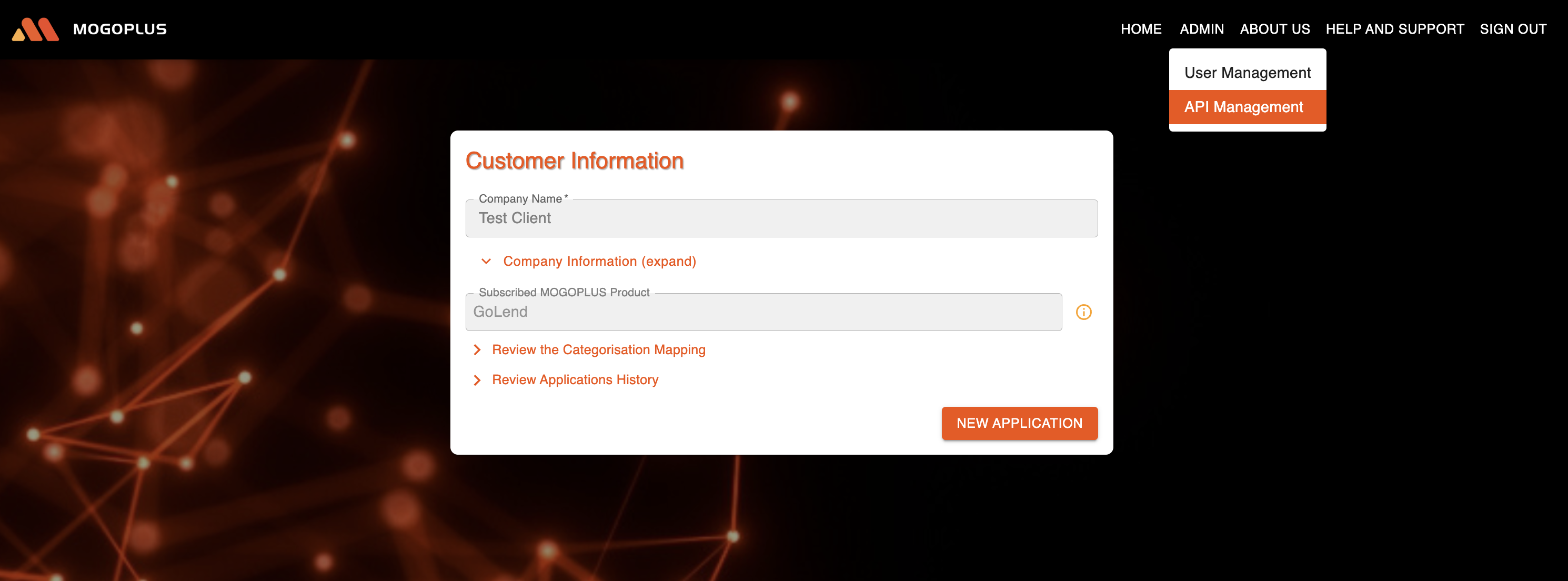
After logging, you will be able to see "ADMIN" button on MOGOPLUS homepage. Upon clicking "ADMIN" button, an Admin will be able to view the "API Management" link.&#x20;

<figure><img src="https://content.gitbook.com/content/Lh8rfYO4feYy9OXJ36Cq/blobs/rzQGtGycPNmccNmhVDJg/image.png" alt=""><figcaption><p>API Management link</p></figcaption></figure>

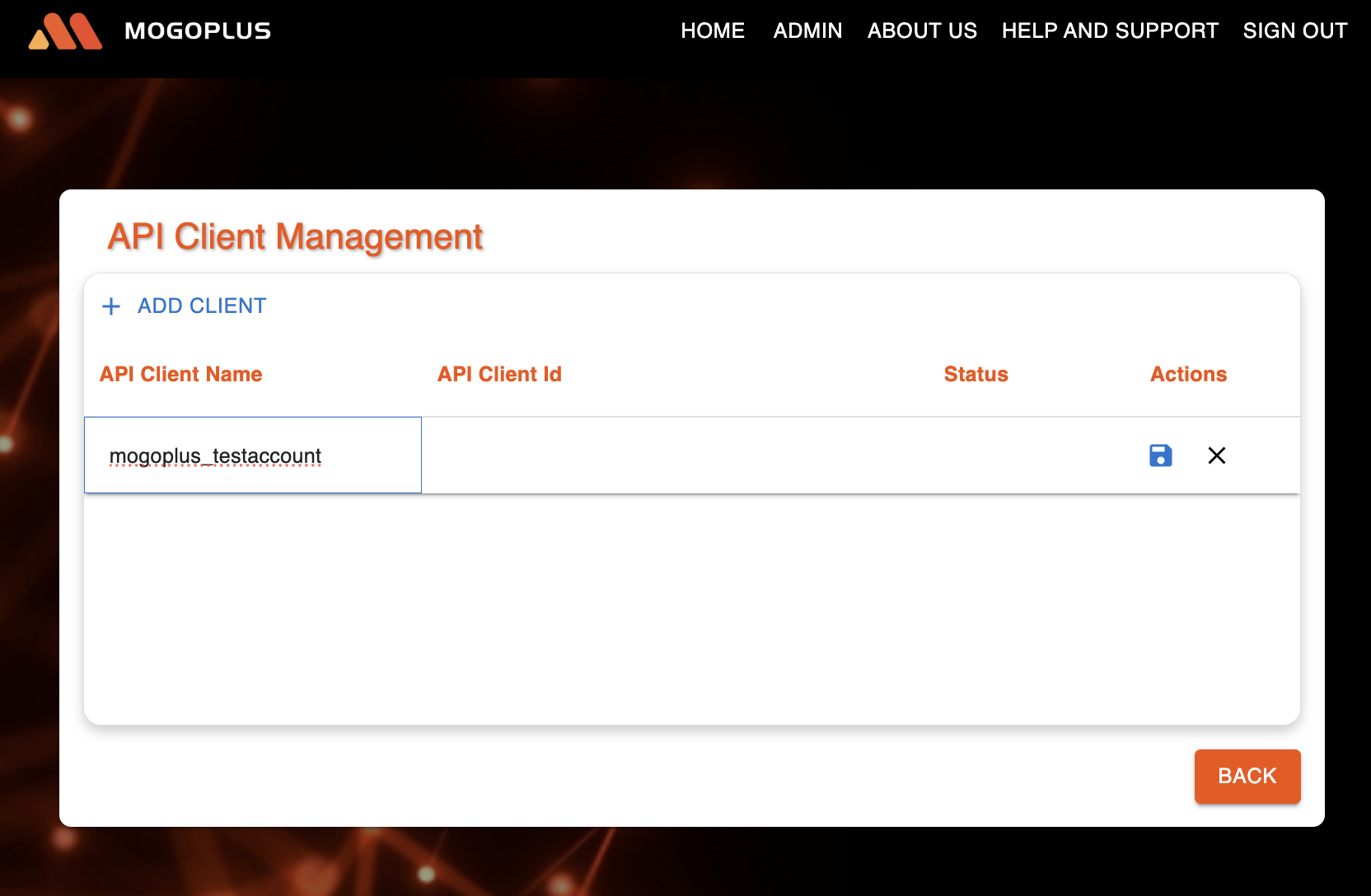
Upon clicking "API Management" link, an Admin will be able to add client by clicking "ADD CLIENT" and then enter the API Client Name.

<figure><img src="https://content.gitbook.com/content/Lh8rfYO4feYy9OXJ36Cq/blobs/kXGq0JhFahIuvDBHgfGx/image.png" alt=""><figcaption><p>Add a client name </p></figcaption></figure>

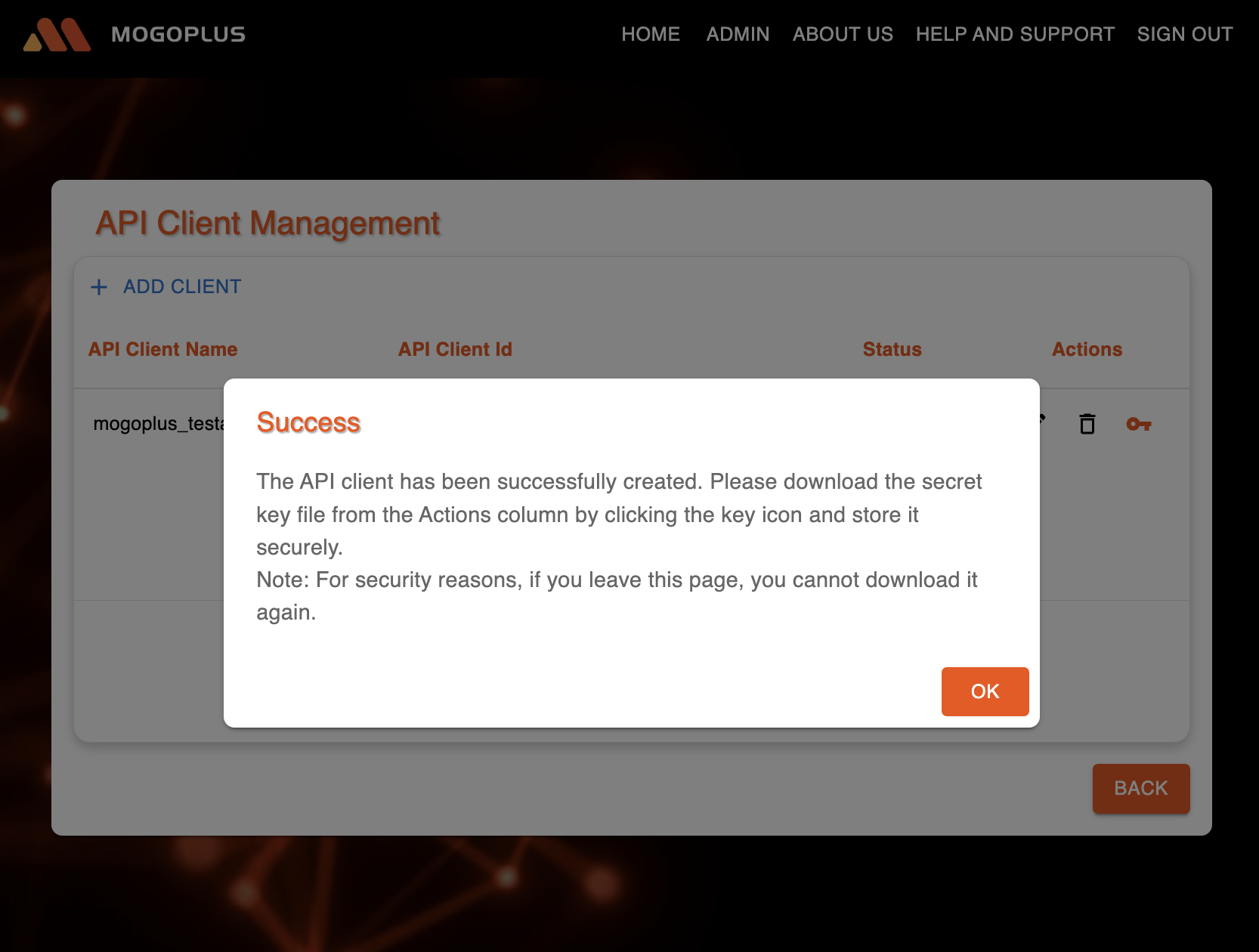
On clicking save button, client\_id and client\_secret (which are required to use the api's) will be generated.

{% hint style="info" %}
**Important Note:**

<mark style="color:$tint;">Once you leave this screen, the generated credentials will no longer be available. Please download them before navigating away from this page</mark>
{% endhint %}

<figure><img src="https://content.gitbook.com/content/Lh8rfYO4feYy9OXJ36Cq/blobs/813hyQoSIYcHWYIJzaHP/image.png" alt=""><figcaption><p>Success message confirming generation of client credentials</p></figcaption></figure>

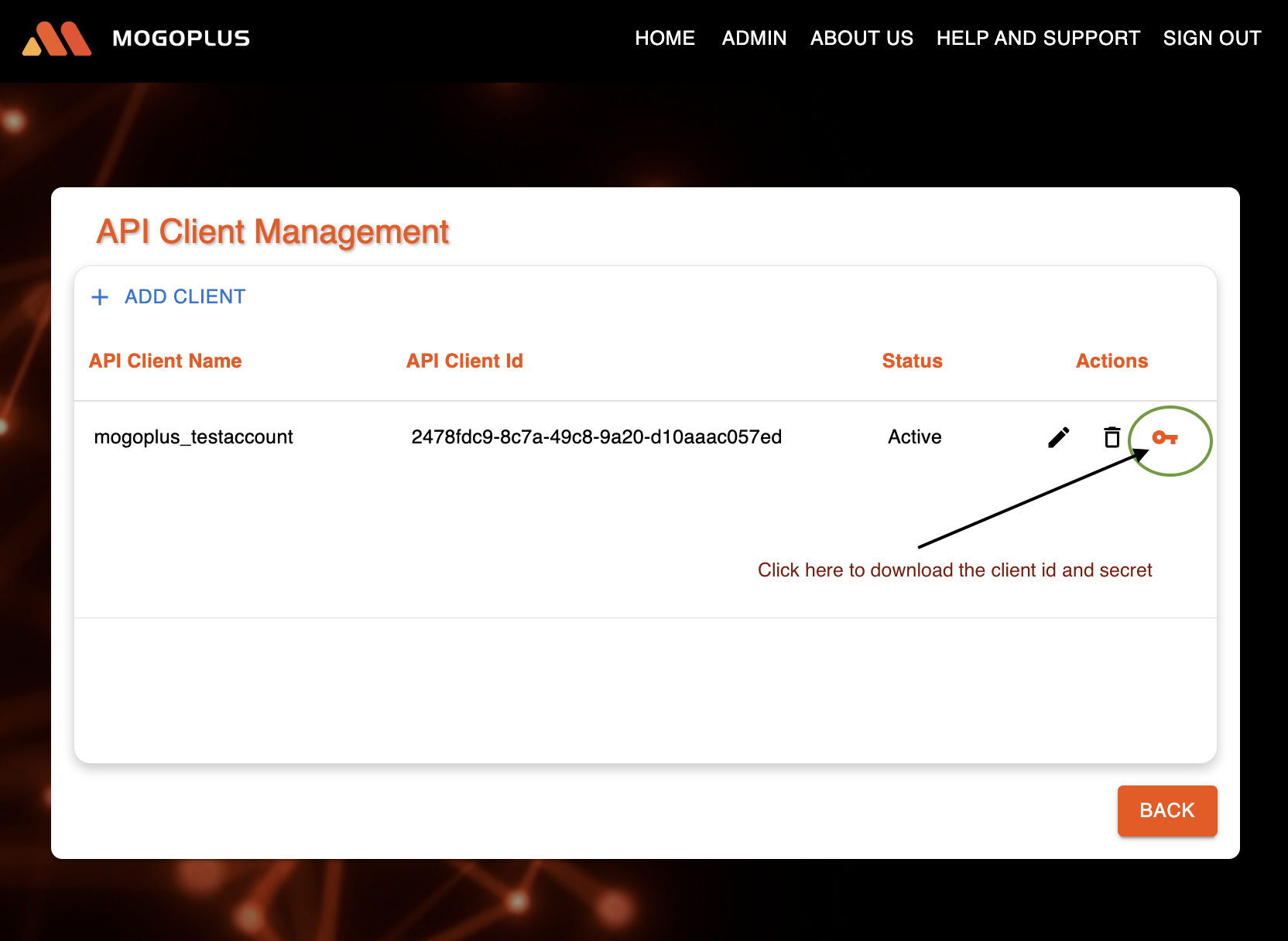
On clicking the key icon, the client id and secret will be downloaded in the form of a JSON file to your machine.&#x20;

<figure><img src="https://content.gitbook.com/content/Lh8rfYO4feYy9OXJ36Cq/blobs/VhNPC64FO5SteqfcZFnp/image.png" alt=""><figcaption><p>Client credentials-download option</p></figcaption></figure>

<figure><img src="https://content.gitbook.com/content/Lh8rfYO4feYy9OXJ36Cq/blobs/156BgC7tSuwMEwDxfum2/image.png" alt=""><figcaption><p>Downloaded file</p></figcaption></figure>

The contents of the file will look like below:

`{`\
`"clientName": "Mogoplus_testaccount",`\
`"clientId": "782e12aa-23d3-11c0-8452-111114a14e13",`\
`"clientSecret": "aaaaaaaa-8b36-471f-c818-d1d2e46b20d4"`\
`}`

The above credentials (Client ID and Client Secret) must be used to invoke the Authentication API to obtain an access token, which should then be included when submitting data and fetching the report


# Products

[MOGOPLUS](https://www.mogoplus.ai/) offers a range of products to help enterprises make informed, data led lending decisions.

### **GoCat**

*Fast, Accurate, and Secure Data Categorisation for Credit Decisioning*

In order to understand the key behavioural patterns in customer data, enterprises require an intelligent approach to categorisation. Our GoCat product turns the unstructured descriptions within the bank transaction data into usable and meaningful industry standard categories as the first step to straight through processing and instant decisioning outcomes in the lending process.

#### Response

Response data will contain Category Group Summary and Category Summary data objects both at application level (i.e if there is more than one applicant or more than one institution) as well as applicant level (i.e per individual customer).

### **GoVerify**

*Comprehensive Financial Profiling and Employer Income Verification*

Reviewing bank statements and payslips manually to verify applicants' financial position and income can be highly time-consuming for credit assessment teams. It is also prone to human error, inaccuracies, or potential fraud. Our GoVerify product uses several unique algorithms and data analytical models to understand critical patterns and relationships across different data points. GoVerify enables credit assessment and underwriting teams to instantly determine the financial behaviour and affordability of the applicants by analysing the recent and historical customer data.

#### Response

The response data will contain Category Group Summary and Category Summary data objects both at application level (i.e if there is more than one applicant or more than one institution) as well as applicant level (i.e per individual customer). Along with categorisation details, this product contains income details (Employer Income, Rental Income, etc grouped as Main or Secondary income) detailing the recency and regularity of income.

### **GoLend**

*Streamlining Serviceability Assessments with Meaningful Analytics for Lending*

With close to 90% of all transactions now captured in digital format, there is more data available to credit providers than ever before. The challenge is to utilise the right data in the right context for the right purpose in the lending journey. Our GoLend product makes sense of raw unstructured data with a focus on serving lending journeys and improving serviceability assessments. Building on our accurate Data Categorisation and Verification solution, GoLend adds further sophistication and utilises additional key analytics and assessment metrics to assist the lender in making more informed and accurate credit decisioning. Using a low touch, configurable solution, unique algorithms and analytical modules focused on statistical calculations, our GoLend product creates a consistent, coherent, and intuitive financial report with decision-ready metrics to help accelerate lending decisioning and enable straight-through processing.

#### Response

The response data will contain Category Group Summary and Category Summary data objects both at application level (i.e if there is more than one applicant or more than one institution) as well as applicant level (i.e per individual customer). Along with categorisation details, this product will also contain Income Insights at both application level and applicant level. The Income Summary is provided as a distinct entity, which includes incomeInsights. This is further broken down into basicIncomeInsights and inferentialIncomeInsights.


# Key concepts and Terminology

### Applicant

In relation to a loan, an applicant is an individual or entity who applies for borrowing money from a lender. The applicant provides personal and financial information to assess eligibility and creditworthiness for the loan.

### Institution

In the context of a loan, an institution typically refers to a financial entity like a bank, credit union, or government agency that offers lending services. These institutions provide loans to individuals or businesses under specific terms, which include interest rates, repayment schedules, and other conditions. Their role is to facilitate the borrowing process, assess creditworthiness, and ensure compliance with financial regulations.

### Account

An account is a record or statement of financial expenditure and receipts relating to a particular period or purpose. It typically involves elements such as a unique identifier, balance details, and transaction history, allowing users to track and manage their financial activities effectively.

### Transaction

A financial transaction is the exchange of money between two parties. It requires mutual agreement and is recorded for accountability. These transactions can occur in banks, online platforms, or during everyday purchases, helping to ensure efficient distribution of financial resources.

### Category

A Dimension that Categorises transactions into specific types (e.g. Employer Income, Rental Income, Groceries, Utilities, Entertainment).

### Category Groups

A Dimension that Groups related categories for broader financial insights.

### Employer Match

A Flag that Indicates if the declared employer name matches transacted records which is useful for income verification.

### Total Amount

A Metric that Calculates the total sum of amounts transacted over a specified period.

### Number of Transactions

A Metric that Counts the total number of transactions within a given time-frame.

### Income Buckets

A Metric that Classifies income into predefined ranges for easier analysis.

### Net Monthly Position

A series of Metrics that Calculates the difference between total credits and total debits on a monthly basis.

### Recency \[of Income]

A series of Metrics that Analyses the recency of received income over a predefined period.

### Regularity \[of Income]

A series of Metrics that Evaluates the regularity of income patterns over time.

### Reliability \[of Income]

A series of Metrics that Assesses the reliability of income sources based on historical data.

### Support Package

Support through Service Desk.


# FAQs

### When does the trial end?

The free trial will expire seven days after the subscription date

### Is there any limit on number of applications that can be submitted during the trial period?

A maximum of 3 applications can be submitted during the trial period.

### What are the supported file formats to upload transactions data?

We accept bank statements(.pdf) and transaction data in CSV format. We also accept payslips, which can be used to generate reports.

### In which formats are the reports provided?

The reports we deliver are available in both rich HTML and printable PDF formats.

### What is the maximum size of a csv file that can be uploaded?

The maximum allowable size for a CSV file upload is 25MB.

### How many transactions/records can a CSV file contain at most?

If you are uploading a single CSV file, it can contain up to 5,000 transactions. If multiple CSV files are uploaded, the total number of transactions combining all the files should not exceed 5,000.

### Whom do I contact if I have further questions?

Send us a message [here](/troubleshooting-and-support/publish-your-docs).


# Contact Support

Contact us through our Support Desk [here](https://mogoplus.atlassian.net/servicedesk/customer/portal/4)

{% hint style="info" %}
If you have any sales enquiry, please reach us on <info@mogoplus.com>
{% endhint %}


# Welcome

At [MOGOPLUS](https://www.mogoplus.ai/), we specialise in making sense of unstructured data within bank transactions to drive customer decisions throughout the lending lifecycle. Our enterprise intelligent insight solutions cater to diverse use cases and customer journeys across multiple sectors. We invite clients to bring their data to the table, where we process and derive actionable value through our configurable Insights-as-a-Service offerings. By analysing unstructured data, MOGOPLUS uplifts customer engagement and empowers organisations to make informed choices, leveraging state-of-the-art technology to meet the dynamic needs of today’s market.

### Jump right in

<table data-view="cards"><thead><tr><th data-type="content-ref"></th></tr></thead><tbody><tr><td><a href="/mogoplus/getting-started/quickstart">Quickstart</a></td></tr><tr><td><a href="/mogoplus/basics/products">Products</a></td></tr><tr><td><a href="/mogoplus/basics/terminology">Key concepts and Terminology</a></td></tr></tbody></table>


# Setting up Google Cloud Account

Google Marketplace Onboarding Instructions

To ensure a smooth onboarding process when setting up your account on Google Marketplace, please follow these key instructions.

## If You Do Not Have a Google Cloud Account

{% hint style="info" %}

## <mark style="color:$info;">If you already have a Google Cloud account, skip to</mark> [<mark style="color:$info;">here</mark>](#after-you-finish-the-google-cloud-account-setup)<mark style="color:$info;">.</mark>

{% endhint %}

If you do not have a Google cloud account, you will need to create one before proceeding. Follow these steps:

### Create Your Google Cloud Account:

* If using a new device, confirm that you can sign into a Google account.
* Click [here](https://cloud.google.com/?hl=en) and Get started
* You need to accept Google Cloud Platform [terms and conditions](https://cloud.google.com/terms/?hl=en). Click on "Agree & continue"
* You need to make sure Payments profile is up to date and does not require any further updates
* Some devices may require setting up Multi-Factor Authentication (MFA) for security. Ensure you can receive authentication codes via your registered method (SMS, Authenticator app, etc.)

### Set Up a Valid Billing Method: <a href="#set-up-a-valid-billing-method" id="set-up-a-valid-billing-method"></a>

* Google Marketplace requires a valid payment method to activate services.
* Acceptable payment methods include a corporate credit card, debit card, or any other valid payment method supported by Google.
* Even if you plan to use only free trial credits, a billing method must be linked to your account.

### Agree to Google Marketplace Terms and Conditions: <a href="#agree-to-google-marketplace-terms-and-conditions" id="agree-to-google-marketplace-terms-and-conditions"></a>

* Before making any purchases or subscribing to services, you must review and accept the Google Marketplace [Terms and Conditions](https://cloud.google.com/terms/marketplace/launcher?hl=en_US&_gl=1*1ejzlzg*_ga*MTIwNzY0MTY3NC4xNjkwMjg4Mjk1*_ga_WH2QY8WWF5*MTc0MDcwMzIxMi4yNDAuMC4xNzQwNzAzMjEyLjYwLjAuMA..) along with MOGOPLUS [Terms and Conditions](https://www.mogoplus.ai/google-eula/)​

### Understand Google’s Free Trial Credits: <a href="#understand-googles-free-trial-credits" id="understand-googles-free-trial-credits"></a>

* Google offers USD $300 in initial credits when you sign up for a new Google Cloud account.
* This is separate from the 30-day or USD $600 trial provided by MOGOPLUS for testing our products.
* You can use these credits to explore and evaluate MOGOPLUS services before committing to a paid plan.

***

## If Your Organisation Already has a Google Cloud Account <a href="#if-your-organisation-already-has-a-google-cloud-account" id="if-your-organisation-already-has-a-google-cloud-account"></a>

If your company has an existing Google Cloud account, follow these steps:

### Verify Access to Your Corporate Google Account: <a href="#verify-access-to-your-corporate-google-account" id="verify-access-to-your-corporate-google-account"></a>

* Ensure you have the **necessary permissions** to sign into your organisation's Google Cloud account.
* If you are unsure about your level of access, check with your IT department or Google Cloud administrator.

### Identify the Google Cloud Admin in Your Organisation: <a href="#identify-the-google-cloud-admin-in-your-organisation" id="identify-the-google-cloud-admin-in-your-organisation"></a>

* Some actions may require **admin approval** (e.g., purchasing services, assigning roles, or managing billing).
* If you **do not have admin rights**, determine who in your organisation **holds admin permissions** and obtain their consent before proceeding.

### Confirm Billing Setup: <a href="#confirm-billing-setup" id="confirm-billing-setup"></a>

* Your organisation should already have a **linked payment method** for Google Cloud Marketplace purchases.
* If billing permissions are restricted, work with your finance or IT team to ensure transactions can be processed smoothly.

## After you finish the Google Cloud account setup <a href="#after-you-finish-the-google-cloud-account-setup" id="after-you-finish-the-google-cloud-account-setup"></a>

* Once the Google Cloud account setup is complete, you can proceed to choose a product from our Google Marketplace [Listings page](https://console.cloud.google.com/marketplace/product/mogoplus-global/mogoplus).
* After selecting the product and agreeing to the terms and conditions, you will be redirected to our Sign-Up page.
* Please follow the steps outlined in our [Quickstart](https://app.gitbook.com/o/J0iCRxlJszWQHKhKuLrW/s/LHww7AqoydMJJa34LxkC/~/diff/~/changes/30/~/revisions/5QdD5xmJ5pewytwJhbnc/getting-started/quickstart) guide to process the applications by uploading the data.


# Quickstart

Help you get started

### Prerequisite

You need a Google Cloud account in order to purchase MOGOPLUS **products** from Google marketplace.

If you **do not have** a Google Cloud account go [here](/mogoplus/before-getting-started/setting-up-google-cloud-account#if-you-do-not-have-a-google-cloud-account).&#x20;

If you **already have** a Google Cloud account, please make sure you are aware of the following [requirements](/mogoplus/before-getting-started/setting-up-google-cloud-account#if-your-organisation-already-has-a-google-cloud-account).&#x20;

### Sign Up

After subscribing to our product on [Google Marketplace](https://console.cloud.google.com/marketplace/product/mogoplus-global/mogoplus), you will be redirected to our Sign-Up page.

*If you have already signed up, skip this and go to the*[ *Sign In*](#sign-in) *Step.*

<figure><img src="https://2770769604-files.gitbook.io/~/files/v0/b/gitbook-x-prod.appspot.com/o/spaces%2FLHww7AqoydMJJa34LxkC%2Fuploads%2FjTy98y8LKuctPGPicZVm%2Fsign-up-mkpl.png?alt=media&amp;token=016cfb36-0af5-492b-962f-440850bc2393" alt=""><figcaption><p>Sign Up Form. Enter your details and click Sign Up.</p></figcaption></figure>

<figure><img src="https://2770769604-files.gitbook.io/~/files/v0/b/gitbook-x-prod.appspot.com/o/spaces%2FLHww7AqoydMJJa34LxkC%2Fuploads%2FhRTjASmaGCO55WiFcmxw%2Fsign-up-sso.png?alt=media&amp;token=b5fe238c-5213-471d-a81a-825d703d7f82" alt=""><figcaption><p>Choose the Google Account that you want to sign-up with and continue.</p></figcaption></figure>

You will now be able to Sign In.

### Sign In

Our Sign In page is [here](https://console.live.mogoplus.ai/login.html).

<figure><img src="https://2770769604-files.gitbook.io/~/files/v0/b/gitbook-x-prod.appspot.com/o/spaces%2FLHww7AqoydMJJa34LxkC%2Fuploads%2F2o83hbFmC2u2LAW6f01h%2Fimage.png?alt=media&amp;token=7fda982c-8cf2-41c3-9db8-94dadb4c2762" alt=""><figcaption><p>Sign In Page after you clicked on Sign in with Google</p></figcaption></figure>

### Accessing MOGOPLUS home page to submit transaction data

After Sign in is successful, you will have access to our console.

<figure><img src="https://2770769604-files.gitbook.io/~/files/v0/b/gitbook-x-prod.appspot.com/o/spaces%2FLHww7AqoydMJJa34LxkC%2Fuploads%2FFo9Q3SUfR8DAbAV4zJsj%2Fimage.png?alt=media&amp;token=9dde2516-5450-4c53-a0cd-d14a7a65d262" alt=""><figcaption><p>Console view for a logged in user.</p></figcaption></figure>

To submit a new application, click "NEW APPLICATION." This will open the applicant details page. Fill in the customer's information and upload a CSV file containing their transactions. Click on the REVIEW button.

<figure><img src="https://2770769604-files.gitbook.io/~/files/v0/b/gitbook-x-prod.appspot.com/o/spaces%2FLHww7AqoydMJJa34LxkC%2Fuploads%2F7eh0Xs3YVwOJt5gox9fJ%2Fimage.png?alt=media&amp;token=c14befea-7219-447e-a2e6-fb4aa50f193d" alt=""><figcaption></figcaption></figure>

A sample CSV file, along with the required columns, is shown below.&#x20;

{% file src="/files/LzRsDGo6aU7kH4BdN9qn" %}
Sample Transactions File, please notice the columns and format
{% endfile %}

Below is a summary of the three columns used in the CSV:

* **TRAN\_DATE**: The date of the transaction, formatted as DD/MM/YYYY, YYYYMMDD or YYYY-MM-DD
* **AMOUNT**: The transaction amount, with negative values indicating a debit.
* **NARRATIVE**: A description of the transaction.

You can use your own CSV file or use the above provided sample file for testing.

If you are using your own CSV files, please ensure that they do not contain any Personally Identifiable Information (PII) and that they adhere to the MOGOPLUS prescribed format.

#### Key information regarding the csv files format:

Your CSV file can include additional columns (e.g., Account Number, Balance, Merchant Name), but only the data in the three columns specified above will be processed. All other columns will be ignored.

*<mark style="color:orange;">**Note**</mark>*<mark style="color:orange;">: Please note that CSV is the only supported file format for uploads as of now</mark>

### Review the csv file data

Review screen will be shown. Click on Submit button to submit the transactions for processing.

<figure><img src="https://2770769604-files.gitbook.io/~/files/v0/b/gitbook-x-prod.appspot.com/o/spaces%2FLHww7AqoydMJJa34LxkC%2Fuploads%2F6ptPOtZhiDGcJgeYi4En%2Fimage.png?alt=media&amp;token=536da42d-b3cf-4565-b4ba-be1f410c36da" alt=""><figcaption><p>Review screen</p></figcaption></figure>

### Submit the csv file for processing

Submission successful message will be shown after the data was submitted successfully

<figure><img src="https://2770769604-files.gitbook.io/~/files/v0/b/gitbook-x-prod.appspot.com/o/spaces%2FLHww7AqoydMJJa34LxkC%2Fuploads%2F1dmqHWHFASpiJdFfQwCh%2Fimage.png?alt=media&amp;token=1c0f256b-b7a3-4907-b6d0-d2937629e45f" alt=""><figcaption><p>Submission Success</p></figcaption></figure>

### Download report

After clicking OK, you will be directed to the home page, where you can track the progress of the data being processed.

<figure><img src="https://2770769604-files.gitbook.io/~/files/v0/b/gitbook-x-prod.appspot.com/o/spaces%2FLHww7AqoydMJJa34LxkC%2Fuploads%2FLt6b1eRqMCJPHqZ0oyMw%2Fimage.png?alt=media&amp;token=bc9b2a94-57a6-40f6-b44a-df596eb57133" alt=""><figcaption></figcaption></figure>

The report will be available once the data processing is complete. This process runs in the background, so you can continue working on other applications or navigate to other pages without waiting.

<figure><img src="https://2770769604-files.gitbook.io/~/files/v0/b/gitbook-x-prod.appspot.com/o/spaces%2FLHww7AqoydMJJa34LxkC%2Fuploads%2F8IGgJ9L9sK8cmGHqQ6xR%2Fimage.png?alt=media&amp;token=ec4f673a-bc22-4810-a36b-d2c5540ac966" alt=""><figcaption></figcaption></figure>

Clicking the download button will save the output file (JSON format) to your local machine.

<figure><img src="https://2770769604-files.gitbook.io/~/files/v0/b/gitbook-x-prod.appspot.com/o/spaces%2FLHww7AqoydMJJa34LxkC%2Fuploads%2FuCFvRpOLUOE8OFjhfS71%2Fimage.png?alt=media&amp;token=c8c7626a-d5cb-4025-978a-16242abe55f6" alt=""><figcaption></figcaption></figure>

You can view reports for submitted applications by expanding the "Review Application History" section.

<figure><img src="https://2770769604-files.gitbook.io/~/files/v0/b/gitbook-x-prod.appspot.com/o/spaces%2FLHww7AqoydMJJa34LxkC%2Fuploads%2FkxWNKxaY1bgCg7ntmx4o%2Fimage.png?alt=media&amp;token=0391fca4-af17-4b4f-bb24-16869b0596ad" alt=""><figcaption><p>Application History</p></figcaption></figure>


# Categorise your way

Here you can understand how to modify/update the default categories to the categories that you need and a lot more

### Review/Modify categories (Optional exercise)

Choose the category/row you would like to change

<figure><img src="https://2770769604-files.gitbook.io/~/files/v0/b/gitbook-x-prod.appspot.com/o/spaces%2FLHww7AqoydMJJa34LxkC%2Fuploads%2FoZHDfInixMwz0BLVVx83%2Fimage.png?alt=media&amp;token=667daa7a-06f0-4c3d-aff4-c4206649f5ae" alt=""><figcaption></figcaption></figure>

Click on the edit icon and change the category name to the name you need

<figure><img src="https://2770769604-files.gitbook.io/~/files/v0/b/gitbook-x-prod.appspot.com/o/spaces%2FLHww7AqoydMJJa34LxkC%2Fuploads%2Fk2UzrnNRLx532Uy18k51%2Fimage.png?alt=media&amp;token=fd9c7434-d856-4a59-9f7e-de9b96d873c1" alt=""><figcaption></figcaption></figure>

Scroll down to the bottom of page and click Save

<figure><img src="https://2770769604-files.gitbook.io/~/files/v0/b/gitbook-x-prod.appspot.com/o/spaces%2FLHww7AqoydMJJa34LxkC%2Fuploads%2FbhaGPx2iU1cUHIdtW96M%2Fimage.png?alt=media&amp;token=96ff7b2f-b1dd-4539-abb9-381b48a35777" alt=""><figcaption></figcaption></figure>

Click "Save" on the confirmation pop-up

<figure><img src="https://2770769604-files.gitbook.io/~/files/v0/b/gitbook-x-prod.appspot.com/o/spaces%2FLHww7AqoydMJJa34LxkC%2Fuploads%2FybItL1U2ClrL8judwhyS%2Fimage.png?alt=media&amp;token=3e1f6245-9d25-4463-b582-b17849b11630" alt=""><figcaption></figcaption></figure>

Client Categorisation mapping will be updated

<figure><img src="https://2770769604-files.gitbook.io/~/files/v0/b/gitbook-x-prod.appspot.com/o/spaces%2FLHww7AqoydMJJa34LxkC%2Fuploads%2F9lp50gOCADkdplaPa1Ho%2FScreenshot%202025-02-12%20at%204.26.40%20pm.png?alt=media&amp;token=be1aaecb-b066-4c62-8c4a-c133904220cc" alt=""><figcaption></figcaption></figure>

**Note**: If the product is other than GoCat, you will see additional options to update the category mapping and the corresponding insights.

<figure><img src="https://2770769604-files.gitbook.io/~/files/v0/b/gitbook-x-prod.appspot.com/o/spaces%2FLHww7AqoydMJJa34LxkC%2Fuploads%2FaiPzqGp53B6YyVbVOHpe%2Fimage.png?alt=media&amp;token=3c1f72f0-e9c4-47fc-ab10-3e0c9d14c4b5" alt=""><figcaption></figcaption></figure>


# User Management

Here are a few key points on how to create, edit, or delete a new user (Admin):

If you are an Admin, you will be able to see "USER MANAGEMENT" button on MOGOPLUS homepage.

{% hint style="info" %}
Please note that the **'USER MANAGEMENT'** button will appear on the home page only during your ***first*** sign-in. For subsequent sign-ins, to access the **User Management** feature, click on **'ADMIN'** and then select **'User Management'**
{% endhint %}

<figure><img src="https://2770769604-files.gitbook.io/~/files/v0/b/gitbook-x-prod.appspot.com/o/spaces%2FLHww7AqoydMJJa34LxkC%2Fuploads%2FjhssLpNmxm3Pij5Mjrej%2Fimage.png?alt=media&amp;token=bc1cc9d9-efde-4ab2-aec0-59cadd67064c" alt=""><figcaption><p>Manage users</p></figcaption></figure>

Upon clicking "User Management" button, an Admin will be able to view the existing users registered against the organisation

<figure><img src="https://2770769604-files.gitbook.io/~/files/v0/b/gitbook-x-prod.appspot.com/o/spaces%2FLHww7AqoydMJJa34LxkC%2Fuploads%2FrjPgzJxySfqMNfTu9vER%2FScreenshot%202025-02-26%20at%2010.30.47%20pm.png?alt=media&amp;token=6aff559a-5600-4229-af63-4fc20213ae17" alt=""><figcaption><p>View or update registered users</p></figcaption></figure>

Admin can add a new user by clicking "ADD USER". A new row will be available.

***Note***: Currently, an admin can add only up to five users, and a maximum of six active users are allowed per organisation at any given time. Also the number of Admins can only be three.

<figure><img src="https://2770769604-files.gitbook.io/~/files/v0/b/gitbook-x-prod.appspot.com/o/spaces%2FLHww7AqoydMJJa34LxkC%2Fuploads%2F9xKpGwPRHLWtIUZDZn6v%2FScreenshot%202025-02-26%20at%2010.52.41%20pm.png?alt=media&amp;token=242218a3-e367-40af-8ba7-81168e8a6525" alt=""><figcaption><p>Create a new user</p></figcaption></figure>

Enter a valid email address and choose the role(Admin/User). Hit Save button to add the user.&#x20;

***Note***: The email domain of new user must be the same as the admin's email domain.

<figure><img src="https://2770769604-files.gitbook.io/~/files/v0/b/gitbook-x-prod.appspot.com/o/spaces%2FLHww7AqoydMJJa34LxkC%2Fuploads%2FgrmNPPMr7iZoiOjKhJPj%2Fimage.png?alt=media&amp;token=70bbf743-b248-4887-83c6-dd740f9038e6" alt=""><figcaption><p>Enter email address and choose a role to add an user</p></figcaption></figure>

A success message will be shown once the user gets created successfully.

<figure><img src="https://2770769604-files.gitbook.io/~/files/v0/b/gitbook-x-prod.appspot.com/o/spaces%2FLHww7AqoydMJJa34LxkC%2Fuploads%2FnZxEAQDJQZgwZMQZ05yz%2Fimage.png?alt=media&amp;token=cc49e770-b006-4333-8988-b0bbd00a8488" alt=""><figcaption><p>User is created successfully</p></figcaption></figure>

A user's status changes to **ACTIVE** upon successful signup.

<figure><img src="https://2770769604-files.gitbook.io/~/files/v0/b/gitbook-x-prod.appspot.com/o/spaces%2FLHww7AqoydMJJa34LxkC%2Fuploads%2Fe1IGaXG33BmEegmrAiG6%2Fimage.png?alt=media&amp;token=a94b04fa-3538-4be8-8a54-01d025df1983" alt=""><figcaption><p>Upon signup, status of user becomes Active</p></figcaption></figure>


# API Management

Helps you with the steps involved in getting the required credentials to invoke Authentication api

If you are an Admin, you will be able to see "ADMIN" button on MOGOPLUS homepage. Upon clicking "ADMIN" button, an Admin will be able to view the "API Management" link.&#x20;

<figure><img src="https://2770769604-files.gitbook.io/~/files/v0/b/gitbook-x-prod.appspot.com/o/spaces%2FLHww7AqoydMJJa34LxkC%2Fuploads%2Fzty8YuS6Ee2yDfW5sGGK%2Fimage.png?alt=media&amp;token=609ca672-e5e8-4528-aacb-6dc7b23145f6" alt=""><figcaption><p>API Management link</p></figcaption></figure>

Upon clicking "API Management" link, an Admin will be able to add client by clicking "ADD CLIENT" link and then entering the API Client Name.

<figure><img src="https://2770769604-files.gitbook.io/~/files/v0/b/gitbook-x-prod.appspot.com/o/spaces%2FLHww7AqoydMJJa34LxkC%2Fuploads%2FsrQNhBxiGIcGIIU3Ve8R%2Fimage.png?alt=media&amp;token=8fc1d7f9-0b06-42d9-a560-fab8344437ae" alt=""><figcaption><p>Add a client name </p></figcaption></figure>

On clicking save button, client\_id and client\_secret (which are required to use the api's) will be generated.

{% hint style="info" %}
**Important Note:**

<mark style="color:$warning;">Once you leave this screen, the generated credentials will no longer be available. Please download them before navigating away from this page</mark>
{% endhint %}

<figure><img src="https://2770769604-files.gitbook.io/~/files/v0/b/gitbook-x-prod.appspot.com/o/spaces%2FLHww7AqoydMJJa34LxkC%2Fuploads%2FxW18kEjUoRPePLH4vqDW%2Fimage.png?alt=media&amp;token=00ebf7df-ff90-4c34-b5f3-9257c232479e" alt=""><figcaption><p>Success message confirming generation of client credentials</p></figcaption></figure>

On clicking the key icon, the client id and secret will be downloaded in the form of a JSON file to your machine.&#x20;

<figure><img src="https://2770769604-files.gitbook.io/~/files/v0/b/gitbook-x-prod.appspot.com/o/spaces%2FLHww7AqoydMJJa34LxkC%2Fuploads%2FbZ3E3XIoCWx6ab97Urbs%2Fimage.png?alt=media&amp;token=6dd6a8a9-4172-4dd5-9ce0-356bc6bc3b8a" alt=""><figcaption><p>Client credentials-download option</p></figcaption></figure>

<figure><img src="https://2770769604-files.gitbook.io/~/files/v0/b/gitbook-x-prod.appspot.com/o/spaces%2FLHww7AqoydMJJa34LxkC%2Fuploads%2FdtEN6A379nlo5yp856oD%2Fimage.png?alt=media&amp;token=a65b2eeb-dbed-478d-9171-654b6991f76f" alt=""><figcaption><p>Downloaded file</p></figcaption></figure>

The contents of the file will look like below:

`{`\
`"clientName": "Mogoplus_testaccount",`\
`"clientId": "782e12aa-23d3-11c0-8452-111114a14e13",`\
`"clientSecret": "aaaaaaaa-8b36-471f-c818-d1d2e46b20d4"`\
`}`

The above credentials (Client ID and Client Secret) must be used to invoke the [Authentication API](/mogoplus/api-reference/authentication#how-to-authenticate) to obtain an access token, which should then be included when submitting data and fetching the report


# Basics

Here you will find the key information related to the APIs.

## MOGOPLUS API Documentation&#x20;

### 1. Introduction

MOGOPLUS provides HTTP APIs for its services. This document outlines the basic information needed to interact with these [APIs](https://docs.mogoplus.ai/api-reference/api-endpoints).&#x20;

### 2. API Endpoints&#x20;

Our API service includes two main endpoints:

1. **Authentication** – Used to generate the authentication token required for accessing the APIs.
2. **Insight/Report Generation** – Processes transactional data to generate insights.

To use the Insight/Report Generation endpoint, you must first obtain an authentication token by calling the Authentication endpoint.

#### 2.1 Authentication API&#x20;

<mark style="background-color:$primary;"><https://auth.live.mogoplus.ai></mark>

#### 2.2 Insights API&#x20;

<mark style="background-color:$primary;"><https://console.live.mogoplus.ai></mark>

### 3. Usage&#x20;

To use these APIs, append the specific endpoint path to the appropriate base URL for your environment. For example:  <mark style="background-color:$primary;"><https://console.live.mogoplus.ai/api/application></mark>

### 4. Authentication

Details on authentication methods and requirements will be provided [here](https://docs.mogoplus.ai/api-reference/authentication). Ensure you have the necessary credentials before attempting to access these APIs.

More information regarding how to get the necessary credentials is listed [here](https://docs.mogoplus.ai/api-management)

### 5. Next Steps

For detailed information on available endpoints, request/response formats, and more, refer to our comprehensive API documentation available [here](https://docs.mogoplus.ai/api-reference/api-endpoints).


# Authentication

This endpoint is provided to allow Google marketplace participants to fetch their access token from MOGOPLUS by passing the required Authorization details.

{% hint style="danger" %}
The client\_id  and client\_secret, which are required to invoke the Authentication API can be generated from Mogoplus console. More information available [here](https://docs.mogoplus.ai/api-management)
{% endhint %}

## How to Authenticate?

* As mentioned above, get the client id and secret from MOGOPLUS console
* Form the request as mentioned below using the above details and send
* You should receive a Bearer token in response to the request

## Login

<mark style="color:green;">`POST/`</mark>`https://auth.live.mogoplus.ai/api/v1/oauth2/token?grant_type=client_credentials`

Invoke the API over mTLS and fetch access token from MOGOPLUS to prove the authenticity of requests

**Headers**

| Name         | Value                             |
| ------------ | --------------------------------- |
| Content-Type | application/x-www-form-urlencoded |
| Accept       | application/json                  |

**Form-data**

| Name            | Value                                                        |
| --------------- | ------------------------------------------------------------ |
| `client_id`     | {generated from user management section in Mogoplus console} |
| `client_secret` | {generated from user management section in Mogoplus console} |

**Parameters**

| Name        | Value               |
| ----------- | ------------------- |
| grant\_type | client\_credentials |

**Response**

{% tabs %}
{% tab title="200" %}

```json
{
    "access_token": "eyJraWQiOiI0ZDIyZTlhMy1hNTcyMKD85Nz3kco6EHxYfTk",
    "token_type": "Bearer",
    "expires_in": 35999
}
```

{% endtab %}

{% tab title="400" %}

```json
{
    "error_description": "OAuth 2.0 Parameter: grant_type",
    "error": "unsupported_grant_type",
    "error_uri": "https://datatracker.ietf.org/doc/html/rfc6749#section-5.2"
}
```

{% endtab %}

{% tab title="401" %}

```json
{
    "error": "invalid_client"
}
```

{% endtab %}
{% endtabs %}


# API Endpoints

The below provides developers with essential information on how to integrate and interact with the API, covering key methods, data formats, request/response structures, and error handling protocols.

{% hint style="warning" %}
Few important points regarding the date and amount fields in the request payload:

1. Supported date formats are DD/MM/YYYY, YYYYMMDD or YYYY-MM-DD
2. Debit amounts are indicated with a negative (-) sign
   {% endhint %}

## Send banking transaction data for insights analysis

> This endpoint is provided to allows customers to send MogoPlus banking data in a single payload. MogoPlus does not set bounds on the data submitted, so API consumers can submit the data pertinent to their needs. If a given dataset is not required for insights analysis - for example, balances is not required - the data can simply be omitted. The minimum requirements will, however is account and transaction data, which must be supplied for meaningful analysis to take place. API consumers can submit data from multiple applicants or across multiple accounts in a single request.<br>

```json
{"openapi":"3.0.3","info":{"title":"MogoPlus CaaS API","version":"0.0.1"},"tags":[{"name":"Banking Data","description":"Banking-related data, including balances and transactions"}],"servers":[{"description":"PROD Server","url":"https://console.live.mogoplus.ai"}],"security":[{"bearerAuth":[]}],"components":{"securitySchemes":{"bearerAuth":{"type":"http","scheme":"bearer","bearerFormat":"JWT"}},"schemas":{"applicantsData":{"type":"array","items":{"$ref":"#/components/schemas/applicationData"}},"applicationData":{"type":"object","properties":{"applicant":{"$ref":"#/components/schemas/applicantCreateProperties"},"bankingTransactionData":{"type":"object","properties":{"institutions":{"type":"array","items":{"type":"object","properties":{"institutionName":{"type":"string"},"accounts":{"type":"array","items":{"type":"object","properties":{"accountNumber":{"type":"string"},"transactions":{"type":"array","items":{"type":"object","properties":{"description":{"type":"string"},"amount":{"type":"number"},"date":{"type":"string"}}}}}}}}}}}}}},"applicantCreateProperties":{"description":"Properties of the banking customer not available in input data","type":"object","properties":{"firstName":{"description":"First name of applicant","type":"string","minLength":1,"maxLength":255,"pattern":"^[a-zA-Z]+(?: |-|)[a-zA-Z]+$"},"lastName":{"description":"Last name of applicant","type":"string","minLength":1,"maxLength":255,"pattern":"^[a-zA-Z]+(?: |-|)[a-zA-Z]+$"},"employerNames":{"type":"array","items":{"type":"string","minLength":1,"maxLength":50},"description":"Employers Name list of a applicant"}},"additionalProperties":false},"insightsIdOrderType":{"description":"Insights ID object","type":"object","required":["insightsId"],"properties":{"insightsId":{"$ref":"#/components/schemas/insightsId"},"insightsReport":{"$ref":"#/components/schemas/insightsIdWithOrders"}}},"insightsId":{"description":"Insights ID object","type":"object","required":["insightsId"],"properties":{"insightsId":{"$ref":"#/components/schemas/insightsIdType"}}},"insightsIdType":{"$ref":"#/components/schemas/uuidV4"},"uuidV4":{"description":"A valid V4 UUID","type":"string","pattern":"^[0-9a-f]{8}-[0-9a-f]{4}-[0-5][0-9a-f]{3}-[089ab][0-9a-f]{3}-[0-9a-f]{12}$"},"insightsIdWithOrders":{"description":"Orders associated with a insight record","type":"object","properties":{"subscriptionId":{"type":"string"},"report":{"description":"The URL for this data insight","type":"string","pattern":"^http(s|):\\/\\/.*\\/banking-data-insights\\/.+$"}}},"httpErrorResponse":{"type":"object","required":["code","detail","title"],"properties":{"code":{"description":"The code of the error encountered. Where the error is specific to the respondent, an application-specific error code, expressed as a string value. If the error is application-specific, the URN code that the specific error extends must be provided in the meta object. Otherwise, the value is the error code URN.","type":"string"},"title":{"description":"A short, human-readable summary of the problem that MUST NOT change from occurrence to occurrence of the problem represented by the error code.","type":"string"},"detail":{"description":"A human-readable explanation specific to this occurrence of the problem.","type":"string"}}}},"responses":{"badRequest":{"description":"Invalid input or arguments","content":{"application/json":{"schema":{"$ref":"#/components/schemas/httpErrorResponse"}}}},"unauthorized":{"description":"Invalid credentials","content":{"application/json":{"schema":{"$ref":"#/components/schemas/httpErrorResponse"}}}},"forbidden":{"description":"Credentials are valid but access to the resource is forbidden due to access controls. Access must be granted for this request to succeed","content":{"application/json":{"schema":{"$ref":"#/components/schemas/httpErrorResponse"}}}},"methodNotSupported":{"description":"Unsupported HTTP method sent","content":{"application/json":{"schema":{"$ref":"#/components/schemas/httpErrorResponse"}}}},"notAcceptable":{"description":"Requested content type is not supported by this API","content":{"application/json":{"schema":{"$ref":"#/components/schemas/httpErrorResponse"}}}},"unprocessableEntity":{"description":"Request cannot be processed by the API as the content contains errors","content":{"application/json":{"schema":{"$ref":"#/components/schemas/httpErrorResponse"}}}},"tooManyRequests":{"description":"The API has receive too many requests from the client and is rate-limiting further requests based on published limits","content":{"application/json":{"schema":{"$ref":"#/components/schemas/httpErrorResponse"}}}},"internalServerError":{"description":"API encountered an error processing the request","content":{"application/json":{"schema":{"$ref":"#/components/schemas/httpErrorResponse"}}}},"serviceUnavailable":{"description":"The API is not currently available due a transient network error, internal service error or planned outage","content":{"application/json":{"schema":{"$ref":"#/components/schemas/httpErrorResponse"}}}}}},"paths":{"/api/application":{"post":{"summary":"Send banking transaction data for insights analysis","description":"This endpoint is provided to allows customers to send MogoPlus banking data in a single payload. MogoPlus does not set bounds on the data submitted, so API consumers can submit the data pertinent to their needs. If a given dataset is not required for insights analysis - for example, balances is not required - the data can simply be omitted. The minimum requirements will, however is account and transaction data, which must be supplied for meaningful analysis to take place. API consumers can submit data from multiple applicants or across multiple accounts in a single request.\n","tags":["Banking Data"],"requestBody":{"description":"Account data supplied by customer, relating to one-or-more accounts held by the customer","content":{"application/json":{"schema":{"description":"Banking data supplied by customer participant","type":"object","properties":{"applicantsData":{"$ref":"#/components/schemas/applicantsData"}},"additionalProperties":false}}}},"responses":{"201":{"description":"Data received successfully and accepted for processing The `insightsId` value is provided for tracking the insights request and retrieving the request from `/banking-data-insights`.\n","content":{"application/json":{"schema":{"type":"object","required":["data","links"],"properties":{"data":{"allOf":[{"$ref":"#/components/schemas/insightsIdOrderType"}]},"links":{"type":"object","required":["self"],"properties":{"self":{"description":"The URL for this data insight","type":"string","pattern":"^http(s|):\\/\\/.*\\/application\\/.+$"}}}}}}}},"400":{"$ref":"#/components/responses/badRequest"},"401":{"$ref":"#/components/responses/unauthorized"},"403":{"$ref":"#/components/responses/forbidden"},"405":{"$ref":"#/components/responses/methodNotSupported"},"406":{"$ref":"#/components/responses/notAcceptable"},"422":{"$ref":"#/components/responses/unprocessableEntity"},"429":{"$ref":"#/components/responses/tooManyRequests"},"500":{"$ref":"#/components/responses/internalServerError"},"503":{"$ref":"#/components/responses/serviceUnavailable"}}}}}}
```

## Retrieve the banking data insights report

> This endpoint provides the insights report. If processing is ongoing the endpoint will return a \`204\` to indicate no data is available.<br>

```json
{"openapi":"3.0.3","info":{"title":"MogoPlus CaaS API","version":"0.0.1"},"tags":[{"name":"Banking Data","description":"Banking-related data, including balances and transactions"}],"servers":[{"description":"PROD Server","url":"https://console.live.mogoplus.ai"}],"security":[{"bearerAuth":[]}],"components":{"securitySchemes":{"bearerAuth":{"type":"http","scheme":"bearer","bearerFormat":"JWT"}},"parameters":{"applicationId":{"name":"applicationId","in":"path","description":"The identifier for a given application submission and the resultant insights aggregated reports","required":true,"schema":{"$ref":"#/components/schemas/resourceId"}}},"schemas":{"resourceId":{"$ref":"#/components/schemas/uuidV4"},"uuidV4":{"description":"A valid V4 UUID","type":"string","pattern":"^[0-9a-f]{8}-[0-9a-f]{4}-[0-5][0-9a-f]{3}-[089ab][0-9a-f]{3}-[0-9a-f]{12}$"},"bankingDataInsightsReport":{"description":"Provides both the state of processing and the response data. Whilst processing is ongoing the `data` object will be omitted.\n","type":"object","required":["insightsHeader","reportString"],"properties":{"insightsHeader":{"type":"object","properties":{"insightsId":{"$ref":"#/components/schemas/insightsIdType"},"insightsPublishDate":{"type":"string"},"clientId":{"type":"string"},"clientName":{"type":"string"},"reports":{"type":"array","items":{"$ref":"#/components/schemas/insightsDataforOrder"}}}},"reportString":{"type":"string"}}},"insightsIdType":{"$ref":"#/components/schemas/uuidV4"},"insightsDataforOrder":{"type":"object","properties":{"reportHeader":{"$ref":"#/components/schemas/reportHeader"},"combinedSummary":{"$ref":"#/components/schemas/combinedSummary"},"applicantSummary":{"$ref":"#/components/schemas/applicantSummary"},"incomeSummary":{"$ref":"#/components/schemas/incomeSummary"}}},"reportHeader":{"type":"object","properties":{"reportId":{"type":"string"},"reportPublishDate":{"type":"string"},"applicationType":{"type":"string"},"numberOfApplicants":{"type":"number"},"applicants":{"type":"array","items":{"type":"object","properties":{"applicantId":{"type":"string"},"applicantName":{"type":"string"}}}}}},"combinedSummary":{"type":"object","description":"aggregated summary data for all applicants in this application","properties":{"combinedNumberOfInstitutions":{"type":"number"},"combinedNumberOfAccounts":{"type":"number"},"combinedNumberOfTransactions":{"type":"number"},"currency":{"type":"string"},"combinedTotalSummary":{"$ref":"#/components/schemas/totalSummary"},"combinedCategoryGroupSummary":{"type":"object","properties":{"combinedCategoryGroups":{"$ref":"#/components/schemas/categoryGroups"}}},"combinedCategorySummary":{"type":"object","properties":{"combined":{"$ref":"#/components/schemas/categories"}}},"netMonthlyPosition":{"type":"object","additionalProperties":{"type":"string"}},"combinedIncomeInsights":{"type":"object","properties":{"basicIncomeInsights":{"$ref":"#/components/schemas/basicIncomeInsights"}}}}},"totalSummary":{"type":"object","properties":{"credit":{"type":"object","properties":{"sumAmount":{"type":"number"},"numberOfTransactions":{"type":"number"},"Average":{"type":"number"}}},"debit":{"type":"object","properties":{"sumAmount":{"type":"number"},"numberOfTransactions":{"type":"number"},"Average":{"type":"number"}}}}},"categoryGroups":{"type":"array","items":{"$ref":"#/components/schemas/categoryGroupItem"}},"categoryGroupItem":{"type":"object","properties":{"categoryGroup":{"type":"string"},"categoryGroupDescription":{"type":"string"},"debit":{"type":"object","properties":{"sumAmount":{"type":"number"},"numberOfTransactions":{"type":"number"},"Average":{"type":"number"}}},"credit":{"type":"object","properties":{"sumAmount":{"type":"number"},"numberOfTransactions":{"type":"number"},"Average":{"type":"number"}}}}},"categories":{"type":"array","items":{"$ref":"#/components/schemas/categoryItem"}},"categoryItem":{"type":"object","properties":{"categoryCode":{"type":"string"},"categoryCodeDescription":{"type":"string"},"credit":{"type":"object","properties":{"sumAmount":{"type":"number"},"numberOfTransactions":{"type":"number"},"Average":{"type":"number"}}},"debit":{"type":"object","properties":{"sumAmount":{"type":"number"},"numberOfTransactions":{"type":"number"},"Average":{"type":"number"}}}}},"basicIncomeInsights":{"type":"object","properties":{"currency":{"type":"string"},"income":{"type":"object","properties":{"sumAmount":{"type":"number"},"numberOfTransactions":{"type":"number"},"averageMonthly":{"type":"number"}}},"incomeBuckets":{"type":"object","additionalProperties":{"type":"string"}}}},"applicantSummary":{"type":"object","description":"summary data for applicants","properties":{"applicants":{"type":"array","items":{"$ref":"#/components/schemas/applicantSummaryData"}}}},"applicantSummaryData":{"type":"object","properties":{"applicantName":{"type":"string"},"numberOfInstitutions":{"type":"number"},"numberOfAccounts":{"type":"number"},"numberOfTransactions":{"type":"number"},"currency":{"type":"string"},"applicantTotalSummary":{"$ref":"#/components/schemas/totalSummary"},"applicantCategoryGroupSummary":{"type":"object","properties":{"applicantCategoryGroups":{"$ref":"#/components/schemas/categoryGroups"}}},"applicantCategorySummary":{"type":"object","properties":{"categories":{"$ref":"#/components/schemas/categories"}}},"applicantDetailedTransaction":{"type":"object","properties":{"institutions":{"type":"array","items":{"$ref":"#/components/schemas/institution"}}}},"netMonthlyPosition":{"type":"object","additionalProperties":{"type":"string"}},"categoryReview":{"type":"array","items":{"type":"object","properties":{"categoryCode":{"type":"string"},"categoryCodeDescription":{"type":"string"},"credit":{"type":"object","properties":{"sumAmount":{"type":"number"},"numberOfTransactions":{"type":"number"},"Average":{"type":"number"}}},"debit":{"type":"object","properties":{"sumAmount":{"type":"number"},"numberOfTransactions":{"type":"number"},"Average":{"type":"number"}}},"transactions":{"type":"array","items":{"$ref":"#/components/schemas/transaction"}}}}}}},"institution":{"type":"object","properties":{"institutionId":{"type":"string"},"institutionName":{"type":"string"},"accounts":{"type":"array","items":{"$ref":"#/components/schemas/account"}}}},"account":{"type":"object","properties":{"accountNumber":{"type":"string"},"accountName":{"type":"string"},"currentBalance":{"type":"number"},"availableBalance":{"type":"number"},"creditLimit":{"type":"number"},"numberOfTransactionsInTotal":{"type":"number"},"numberOfTransactionsCategorised":{"type":"number"},"transactions":{"type":"array","items":{"$ref":"#/components/schemas/transaction"}}}},"transaction":{"type":"object","properties":{"transactionId":{"type":"string"},"transactionDate":{"type":"string"},"transactionCategoryGroup":{"type":"string"},"transactionCategoryCode":{"type":"string"},"transactionDescription":{"type":"string"},"transactionAmount":{"type":"number"},"transactionCurrency":{"type":"string"}}},"incomeSummary":{"type":"object","description":"summary data of income for applicants","properties":{"applicants":{"type":"array","items":{"$ref":"#/components/schemas/incomeSummaryData"}}}},"incomeSummaryData":{"type":"object","properties":{"applicantName":{"type":"string"},"employmentInsights":{"type":"array","items":{"type":"object","properties":{"declaredEmployerName":{"type":"string"},"employerNameVerified":{"type":"boolean"},"latestEmployerVerifiedSalaryDate":{"type":"string"},"latestEmployerVerifiedSalaryAmount":{"type":"number"}}}},"IncomeInsights":{"type":"object","properties":{"basicIncomeInsights":{"$ref":"#/components/schemas/basicIncomeInsights"},"inferentialIncomeInsights":{"type":"array","items":{"type":"object","properties":{"type":{"type":"string"},"employer":{"type":"string"},"recency":{"type":"object","properties":{"daysInPriorMonth":{"type":"number"},"numberOfTransactionsInPriorMonth":{"type":"number"}}},"regularity":{"type":"object","properties":{"numberOfTransactions":{"type":"number"},"incomeDates":{"type":"array","items":{"type":"string"}},"statisticsOfDayIntervals":{"type":"object","properties":{"max":{"type":"number"},"min":{"type":"number"},"mean":{"type":"number"},"median":{"type":"number"},"mode":{"type":"number"},"standardDeviation":{"type":"number"}}}}},"reliability":{"type":"object","properties":{"numberOfTransactions":{"type":"number"},"incomeAmounts":{"type":"array","items":{"type":"object","properties":{"date":{"type":"string"},"amount":{"type":"number"}}}},"statisticsOfSalaryAmount":{"type":"object","properties":{"average":{"type":"number"},"median":{"type":"number"},"mode":{"type":"number"},"range":{"type":"number"},"standardDeviation":{"type":"number"}}}}}}}}}}}},"httpErrorResponse":{"type":"object","required":["code","detail","title"],"properties":{"code":{"description":"The code of the error encountered. Where the error is specific to the respondent, an application-specific error code, expressed as a string value. If the error is application-specific, the URN code that the specific error extends must be provided in the meta object. Otherwise, the value is the error code URN.","type":"string"},"title":{"description":"A short, human-readable summary of the problem that MUST NOT change from occurrence to occurrence of the problem represented by the error code.","type":"string"},"detail":{"description":"A human-readable explanation specific to this occurrence of the problem.","type":"string"}}}},"responses":{"partialContent":{"description":"partial response content, meaning inprogress","content":{"application/json":{"schema":{"$ref":"#/components/schemas/httpErrorResponse"}}}},"badRequest":{"description":"Invalid input or arguments","content":{"application/json":{"schema":{"$ref":"#/components/schemas/httpErrorResponse"}}}},"unauthorized":{"description":"Invalid credentials","content":{"application/json":{"schema":{"$ref":"#/components/schemas/httpErrorResponse"}}}},"forbidden":{"description":"Credentials are valid but access to the resource is forbidden due to access controls. Access must be granted for this request to succeed","content":{"application/json":{"schema":{"$ref":"#/components/schemas/httpErrorResponse"}}}},"methodNotSupported":{"description":"Unsupported HTTP method sent","content":{"application/json":{"schema":{"$ref":"#/components/schemas/httpErrorResponse"}}}},"notAcceptable":{"description":"Requested content type is not supported by this API","content":{"application/json":{"schema":{"$ref":"#/components/schemas/httpErrorResponse"}}}},"tooManyRequests":{"description":"The API has receive too many requests from the client and is rate-limiting further requests based on published limits","content":{"application/json":{"schema":{"$ref":"#/components/schemas/httpErrorResponse"}}}},"internalServerError":{"description":"API encountered an error processing the request","content":{"application/json":{"schema":{"$ref":"#/components/schemas/httpErrorResponse"}}}},"serviceUnavailable":{"description":"The API is not currently available due a transient network error, internal service error or planned outage","content":{"application/json":{"schema":{"$ref":"#/components/schemas/httpErrorResponse"}}}}}},"paths":{"/api/application/{applicationId}":{"get":{"summary":"Retrieve the banking data insights report","description":"This endpoint provides the insights report. If processing is ongoing the endpoint will return a `204` to indicate no data is available.\n","operationId":"RetrieveBankingDataInsights","tags":["Banking Data"],"parameters":[{"$ref":"#/components/parameters/applicationId"}],"responses":{"200":{"description":"The banking data insights report","content":{"application/json":{"schema":{"$ref":"#/components/schemas/bankingDataInsightsReport"}}}},"206":{"$ref":"#/components/responses/partialContent"},"400":{"$ref":"#/components/responses/badRequest"},"401":{"$ref":"#/components/responses/unauthorized"},"403":{"$ref":"#/components/responses/forbidden"},"405":{"$ref":"#/components/responses/methodNotSupported"},"406":{"$ref":"#/components/responses/notAcceptable"},"429":{"$ref":"#/components/responses/tooManyRequests"},"500":{"$ref":"#/components/responses/internalServerError"},"503":{"$ref":"#/components/responses/serviceUnavailable"}}}}}}
```


# Products

[MOGOPLUS](https://www.mogoplus.ai/) offers a range of products to help enterprises make informed data led lending decisions.

### **GoCat**

*Fast, Accurate, and Secure Data Categorisation for Credit Decisioning*

In order to understand the key behavioural patterns in customer data, enterprises require an intelligent approach to categorisation. Our GoCat product turns the unstructured descriptions within the bank transaction data into usable and meaningful industry standard categories as the first step to straight through processing and instant decisioning outcomes in the lending process.

#### Response

Response data will contain Category Group Summary and Category Summary data objects both at application level (i.e if there is more than one applicant or more than one institution) as well as applicant level (i.e per individual customer).

### **GoVerify**

*Comprehensive Financial Profiling and Employer Income Verification*

Reviewing bank statements and payslips manually to verify applicants' financial position and income can be highly time-consuming for credit assessment teams. It is also prone to human error, inaccuracies, or potential fraud. Our GoVerify product uses several unique algorithms and data analytical models to understand critical patterns and relationships across different data points. GoVerify enables credit assessment and underwriting teams to instantly determine the financial behaviour and affordability of the applicants by analysing the recent and historical customer data.

#### Response

The response data will contain Category Group Summary and Category Summary data objects both at application level (i.e if there is more than one applicant or more than one institution) as well as applicant level (i.e per individual customer). Along with categorisation details, this product contains income details (Employer Income, Rental Income, etc grouped as Main or Secondary income) detailing the recency and regularity of income.

### **GoLend**

*Streamlining Serviceability Assessments with Meaningful Analytics for Lending*

With close to 90% of all transactions now captured in digital format, there is more data available to credit providers than ever before. The challenge is to utilise the right data in the right context for the right purpose in the lending journey. Our GoLend product makes sense of raw unstructured data with a focus on serving lending journeys and improving serviceability assessments. Building on our accurate Data Categorisation and Verification solution, GoLend adds further sophistication and utilises additional key analytics and assessment metrics to assist the lender in making more informed and accurate credit decisioning. Using a low touch, configurable solution, unique algorithms and analytical modules focused on statistical calculations, our GoLend product creates a consistent, coherent, and intuitive financial report with decision-ready metrics to help accelerate lending decisioning and enable straight-through processing.

#### Response

The response data will contain Category Group Summary and Category Summary data objects both at application level (i.e if there is more than one applicant or more than one institution) as well as applicant level (i.e per individual customer). Along with categorisation details, this product will also contain Income Insights at both application level and applicant level. The Income Summary is provided as a distinct entity, which includes incomeInsights. This is further broken down into basicIncomeInsights and inferentialIncomeInsights.


# Key concepts and Terminology

### Applicant

In relation to a loan, an applicant is an individual or entity who applies for borrowing money from a lender. The applicant provides personal and financial information to assess eligibility and creditworthiness for the loan.

### Institution

In the context of a loan, an institution typically refers to a financial entity like a bank, credit union, or government agency that offers lending services. These institutions provide loans to individuals or businesses under specific terms, which include interest rates, repayment schedules, and other conditions. Their role is to facilitate the borrowing process, assess creditworthiness, and ensure compliance with financial regulations.

### Account

An account is a record or statement of financial expenditure and receipts relating to a particular period or purpose. It typically involves elements such as a unique identifier, balance details, and transaction history, allowing users to track and manage their financial activities effectively.

### Transaction

A financial transaction is the exchange of money between two parties. It requires mutual agreement and is recorded for accountability. These transactions can occur in banks, online platforms, or during everyday purchases, helping to ensure efficient distribution of financial resources.

### Category

A Dimension that Categorises transactions into specific types (e.g. Employer Income, Rental Income, Groceries, Utilities, Entertainment).

### Category Groups

A Dimension that Groups related categories for broader financial insights.

### Employer Match

A Flag that Indicates if the declared employer name matches transacted records which is useful for income verification.

### Total Amount

A Metric that Calculates the total sum of amounts transacted over a specified period.

### Number of Transactions

A Metric that Counts the total number of transactions within a given time-frame.

### Average

A Metric that Calculates the average balance (credit or debit amount) across various dimensions, including Categories and Category Groups.

### Income Buckets

A Metric that Classifies income into predefined ranges for easier analysis.

### Net Monthly Position

A series of Metrics that Calculates the difference between total credits and total debits on a monthly basis.

### Recency \[of Income]

A series of Metrics that Analyses the recency of received income over a predefined period.

### Regularity \[of Income]

A series of Metrics that Evaluates the regularity of income patterns over time.

### Reliability \[of Income]

A series of Metrics that Assesses the reliability of income sources based on historical data.

### Support Package

Support through Service Desk.


# FAQs

### What are the charges based upon?

There are two components to the charge:

1. Subscription Fee:
   * This is a monthly fee based on the plan selected during purchase.
   * The amount remains constant each month, regardless of usage.
2. Usage Fee:
   * This fee is based on the number of transactions submitted for processing.
   * Transactions are charged in units of 500.
   * Calculation method: a. 1-500 transactions = 1 unit b. 501-1000 transactions = 2 units c. 1001-1500 transactions = 3 units, and so on.

Examples:

* If you submit 400 transactions, you are charged for 1 unit.
* If you submit 1450 transactions, you are charged for 3 units.

Note: The usage fee is calculated based on the number of transactions submitted at one time, not the total transactions over a month.

For detailed pricing information, please refer to our pricing page or contact our sales team.

### How does the billing process work?

For example, if you are using the GoCat product (plan) for 10 days, and start to submitting **10 applications** per day from day 1 (where each application contains less than 500 transactions, i.e., each transaction is considered as 1 unit), you will be charged approximately **USD 383.33**.

This amount includes:

* **Subscription Fee**: \~**183.3 USD** pro rata for 10 days
  * Given a 30 day month, the subscription fee amount is calculated as 10 × 550 / 30 = 183.3 (where subscription fee is USD 550 per month)
* **Usage Fee**: **200 USD** for 100 Applications
  * Since all Applications have less than 500 transactions, the usage fee amount is calculated as 10 days × 10 Applications × 1 unit per Application × 2 USD per unit = 200 USD
* **Total Charge**: **183.3 + 200 = \~383 USD**

### What are the supported file formats to upload transactions data?

Currently, only CSV files can be uploaded.

### In which formats are the reports provided?

We offer reports in both JSON and PDF formats

### What is the maximum size of a csv file that can be uploaded?

The maximum allowable size for a CSV file upload is 1MB.

### How many transactions/records can a CSV file contain at most?

If you are uploading a single CSV file, it can contain up to 10,000 transactions. If multiple CSV files are uploaded, the total number of transactions across all files should not exceed 10,000.

### Do you have an API?

Yes. More information regarding our api's can be found [here](https://app.gitbook.com/o/J0iCRxlJszWQHKhKuLrW/s/LHww7AqoydMJJa34LxkC/~/changes/32/api-reference)

### Whom do I contact if I have further questions?

Send us a message by clicking on the link [here](/mogoplus/troubleshooting-and-support/publish-your-docs).


# Contact Support

Contact us through our Support Desk [here](https://mogoplus.atlassian.net/servicedesk/customer/portal/4).


# Releases

Feb **2025**

GoLend and GoVerify products are now available.

We have enabled a trial in the Google Cloud Marketplace.

Added user management for organization admins.

**Nov 2024**

SaaS available for purchase from Google Cloud Marketplace.


# Welcome

At [MOGOPLUS](https://www.mogoplus.ai/), we specialise in making sense of unstructured data within bank transactions to drive customer decisions throughout their lending lifecycle. Our enterprise intelligent insight solutions cater to diverse use cases and customer journeys across multiple sectors. We invite clients to bring their data to the table, where we process and derive actionable value through our configurable Insights-as-a-Service offerings. By analysing unstructured data, MOGOPLUS uplifts customer engagement and empowers organisations to make informed choices, leveraging state-of-the-art technology to meet the dynamic needs of today’s market.

MOGOPLUS provides flexible options for processing open banking data. Either Accredited Data Recipients (ADRs) can directly send their data to MOGOPLUS, or clients can collect data from ADRs and then pass it to MOGOPLUS for analysis. MOGOPLUS processes the data to generate insights reports, which clients can retrieve and manage through MOGOPLUS API endpoints, enabling streamlined access to actionable insights.


# MOGOPLUS Open Banking Solution Overview

This below solution illustrates the data flow and security protocols that are put in place for the CDR data that interacts with various endpoints on the MOGOPLUS platform.

<figure><picture><source srcset="/files/mFUeBpIyz8hATxXwILwM" media="(prefers-color-scheme: dark)"><img src="https://2149642755-files.gitbook.io/~/files/v0/b/gitbook-x-prod.appspot.com/o/spaces%2FFBAdWZLNeF8dZ5UDPTMa%2Fuploads%2F8k6fPc3d2idsbnMfvhl3%2Fob-diagram-transparent.png?alt=media&amp;token=b0e71c5d-928e-4764-b282-654d79b1ba4e" alt=""></picture><figcaption><p>This diagram illustrates a secure data-sharing workflow between the Lender, ADR, CDR Source and MOGOPLUS.</p></figcaption></figure>

## Data Flow Explanation:

### 1. Consent and Customer Order:

* Applicants provide consent to the **Lender** to access their data.
* The lender then initiates a **Insights Order** which triggers the data retrieval process.

### 2. Data Retrieval by ADR:

* The ADR sends a request to the **CDR Source** to obtain **CDR Data**.
* Upon receiving the CDR Data, ADR prepares it for submission.

### 3. Data Submission to MOGOPLUS:

* The ADR submits the collected data to **MOGOPLUS** using secure communication protocols **(mTLS + Token)**.
* This ensures the data is transmitted securely.

### 4. Insights Report:

* MOGOPLUS processes the submitted data and generates an **Insights Report**.
* This report is sent back to the ADR, which can be accessed by the lender.


# Basics

Here you will find the key information related to the APIs.

## MOGOPLUS API Documentation&#x20;

### 1. Introduction

MOGOPLUS provides HTTP APIs for its services. This document outlines the basic information needed to interact with these [APIs](/mogoplus-open-banking/api-reference/api-endpoints).&#x20;

### 2. Environments&#x20;

#### MOGOPLUS offers two environments:

\- Test Environment: For Proof of Concept (POC) and development purposes&#x20;

\- Production Environment: For live, production use&#x20;

### 3. API Endpoints&#x20;

#### 3.1 Authentication API&#x20;

\- Test Environment: [https://auth.auuat.mogoplus.com](https://auth.auuat.mogoplus.com/)&#x20;

\- Production Environment: [https://auth.aulive.mogoplus.com](https://auth.aulive.mogoplus.com/)&#x20;

#### 3.2 CDR (Consumer Data Right) API&#x20;

\- Base Path: /cdr-data/v2/banking-data-insights&#x20;

\- Test Environment: [https://cdr.auuat.mogoplus.com](https://cdr.auuat.mogoplus.com/)&#x20;

\- Production Environment: [https://cdr.aulive.mogoplus.com](https://cdr.aulive.mogoplus.com/)&#x20;

### 4. Usage&#x20;

To use these APIs, append the specific endpoint path to the appropriate base URL for your environment. For example:&#x20;

\- Test Environment CDR API: <https://cdr.auuat.mogoplus.com/cdr-data/v2/banking-data-insights>&#x20;

\- Production Environment CDR API: <https://cdr.aulive.mogoplus.com/cdr-data/v2/banking-data-insights>&#x20;

### 5. Authentication

Details on authentication methods and requirements will be provided [here](/mogoplus-open-banking/api-reference/authentication). Ensure you have the necessary credentials before attempting to access these APIs.&#x20;

### 6. Next Steps

For detailed information on available endpoints, request/response formats, and more, refer to our comprehensive API documentation available [here](/mogoplus-open-banking/api-reference/api-endpoints).


# Authentication

This endpoint is provided to allow CDR participants to fetch their access token from MOGOPLUS by passing the required Authorization details.

{% hint style="info" %}
The client certificate and key, which are required to invoke the Authentication API will be provided by MOGOPLUS team.
{% endhint %}

## How to Authenticate?

* Get the client certificate and key from MOGOPLUS team
* Request MOGOPLUS team to provide Basic Auth info (username and password)
* Form the request as mentioned below using the above details and send
* You should receive a Bearer token in response to the request

## Login

<mark style="color:green;">`POST/`</mark>`https://auth.auuat.mogoplus.com/api/v1/oauth2/token?grant_type=client_credentials`

Invoke the API over mTLS and fetch access token from MOGOPLUS to prove the authenticity of requests

**Headers**

| Name          | Value                                |
| ------------- | ------------------------------------ |
| Content-Type  | `application/json`                   |
| Authorization | `Basic Auth <username and password>` |

**Parameters**

| Name        | Value               |
| ----------- | ------------------- |
| grant\_type | client\_credentials |

**Response**

{% tabs %}
{% tab title="200" %}

```json
{
    "access_token": "eyJraWQiOiI0ZDIyZTlhMy1hNTcyMKD85Nz3kco6EHxYfTk",
    "token_type": "Bearer",
    "expires_in": 35999
}
```

{% endtab %}

{% tab title="400" %}

```json
{
    "error_description": "OAuth 2.0 Parameter: grant_type",
    "error": "unsupported_grant_type",
    "error_uri": "https://datatracker.ietf.org/doc/html/rfc6749#section-5.2"
}
```

{% endtab %}

{% tab title="401" %}

```json
{
    "error": "invalid_client"
}
```

{% endtab %}
{% endtabs %}


# API Endpoints

The below provides developers with essential information on how to integrate and interact with the API, covering key methods, data formats, request/response structures, and error handling protocols.

{% openapi src="/files/IPTlk5j5wXZzwVUfAoF2" path="/cdr-data/v2/banking-data-insights" method="post" %}
[cdr-submissions-v2.5.1 (2).yml](https://2149642755-files.gitbook.io/~/files/v0/b/gitbook-x-prod.appspot.com/o/spaces%2FFBAdWZLNeF8dZ5UDPTMa%2Fuploads%2FK7eQw7aLapDUjGLeWd6O%2Fcdr-submissions-v2.5.1%20\(2\).yml?alt=media\&token=0ac748fd-7891-4237-8686-3db92a9f1cb2)
{% endopenapi %}

{% openapi src="/files/IPTlk5j5wXZzwVUfAoF2" path="/cdr-data/v2/banking-data-insights/{insightsId}" method="get" %}
[cdr-submissions-v2.5.1 (2).yml](https://2149642755-files.gitbook.io/~/files/v0/b/gitbook-x-prod.appspot.com/o/spaces%2FFBAdWZLNeF8dZ5UDPTMa%2Fuploads%2FK7eQw7aLapDUjGLeWd6O%2Fcdr-submissions-v2.5.1%20\(2\).yml?alt=media\&token=0ac748fd-7891-4237-8686-3db92a9f1cb2)
{% endopenapi %}

{% openapi src="/files/IPTlk5j5wXZzwVUfAoF2" path="/cdr-data/v2/banking-data-insights/{insightsId}" method="delete" %}
[cdr-submissions-v2.5.1 (2).yml](https://2149642755-files.gitbook.io/~/files/v0/b/gitbook-x-prod.appspot.com/o/spaces%2FFBAdWZLNeF8dZ5UDPTMa%2Fuploads%2FK7eQw7aLapDUjGLeWd6O%2Fcdr-submissions-v2.5.1%20\(2\).yml?alt=media\&token=0ac748fd-7891-4237-8686-3db92a9f1cb2)
{% endopenapi %}

{% openapi src="/files/IPTlk5j5wXZzwVUfAoF2" path="/cdr-data/v2/banking-data-insights/{insightsId}/orders/{orderId}" method="get" %}
[cdr-submissions-v2.5.1 (2).yml](https://2149642755-files.gitbook.io/~/files/v0/b/gitbook-x-prod.appspot.com/o/spaces%2FFBAdWZLNeF8dZ5UDPTMa%2Fuploads%2FK7eQw7aLapDUjGLeWd6O%2Fcdr-submissions-v2.5.1%20\(2\).yml?alt=media\&token=0ac748fd-7891-4237-8686-3db92a9f1cb2)
{% endopenapi %}


# Frequently asked questions

<details>

<summary>How do I Sign Up?</summary>

Please contact our team using the details available [here](/mogoplus-open-banking/faqs/contact-us). Our team is committed to responding promptly. You can expect to hear back from us within 1-2 business days.

</details>

<details>

<summary>When is a client able to retrieve the report for the data submitted to MOGOPLUS?</summary>

A client can collect the report for the data fed to MOGOPLUS once the processing is completed. Typically, MOGOPLUS will send a notification to the *configured URL* once the report is ready for collection. This notification indicates that the report has been successfully generated and is available for download.

</details>

<details>

<summary>Is a date required for each transaction in the request payload?</summary>

Yes, either of "valueDateTime", "executionDateTime" or "postingDateTime" is required against every transaction that is being sent to MOGOPLUS.

</details>

<details>

<summary>When multiple dates are associated with a transaction, which one will be considered?</summary>

The order of priority is postingDateTime > valueDateTime > executionDateTime. ie if the postingDateTime is available along with the other two dates, then the other two dates will be ignored. Similarly if only valueDateTime and executionDateTime are available, valueDateTime will be considered and the other date will be ignored.

</details>

<details>

<summary>What is the maximum data size allowed for a single request?</summary>

MOGOPLUS accepts a data size of 3MB for a single request.

</details>


# Contact Us

You can reach out to our support team for any assistance or queries by sending an email to <jira.support@mogoplus.com>. We are here to help and ensure your experience with our services is smooth and trouble-free.


# Glossary

| Code/Name | Description                  |
| --------- | ---------------------------- |
| ADR       | Accredited Data Recipients   |
| CDR       | Consumer Data Right          |
| OSP       | Outsourced Service Providers |